-
Written By Abhilash Dogra
-
Updated on May 19th, 2026
How to move IMAP to AOL Mail on Mac: Complete Guide
Summary: IMAP is a standard email protocol that helps you to access your messages across multiple devices & even keeps all your data stored on the mail server. On the other hand, AOL Mail is a popular cloud-based email service known for its simple interface & dependable storage for both personal and professional needs. Since both systems work on entirely different frameworks, most of the users face compatibility issues when they perform conversion directly on a Mac. In this blog, we will walk through the most dependable approaches to move IMAP to AOL Mail on Mac without any data loss. We will also highlight the MacGater IMAP Backup Tool as an efficient solution for a smooth migration experience.
Reasons to Move IMAP Email to AOL Mail
Below are some of the reasons why most of the users choose to transfer their IMAP emails to AOL Mai:
- You can access your emails anytime from any device through an active internet connection.
- With AOL Mail, users no longer need to deal with complex IMAP server setup or routine server management.
- You get benefits from a simple & more user-friendly interface for your daily email handling.
- Likewise, it helps to keep all your important email data securely stored online for improved accessibility.
Top Approaches to Move IMAP to AOL Mail on Mac
There are different ways to migrate IMAP emails to AOL Mail on Mac, which depend on your technical expertise & migration preferences. Subsequently, users can choose either of the given methods:
- Native Method
- Automated Solution
Approach 01: Native Method to Import IMAP to AOL Mail
The manual method to migrate your IMAP emails to AOL Mail on Mac involves configuring both email accounts in a desktop email client. After that, you can easily transfer your mailbox data between them.
Steps for IMAP to AOL Mail Migration:
- Firstly, you need to open Apple Mail on your Mac & simply add your IMAP account via your correct server settings.
- After that, you have to add your AOL Mail account to the same application using valid login credentials.
- Now, let both accounts complete the synchronization process so that all mailbox folders are loaded properly.
- Thereafter, you have to select the emails or folders you want to transfer from the IMAP account.
- In this step, you have to simply drag and drop the selected data into the desired AOL Mail folder.
- At last, you need to wait for the synchronization to complete and verify the emails in AOL Mail.
Drawbacks of the Manual Method:
- This process of conversion includes multiple steps, which makes it time-consuming.
- Proper technical skills are required in order to set up email configuration & manage both accounts properly.
- Moreover, some of your emails may not sync properly, which results in incomplete data transfer.
- Likewise, this method is not suitable to migrate your multiple IMAP accounts at the same time.
Approach 02: Automated Solution to Move IMAP to AOL Mail
The MacGater IMAP Backup Tool is a reliable solution that migrates your IMAP emails to AOL Mail on Mac without data loss. The software supports IMAP accounts of all sizes & preserves email properties during migration. Moreover, it includes advanced filters for selective transfer, which allow its users to migrate only the required mailbox data. Likewise, the free demo version lets users evaluate the tool.
Quick Tutorial to Transfer Emails from IMAP to AOL Mail:
- Firstly, you have to open the MacGater IMAP Backup Tool on your Mac.
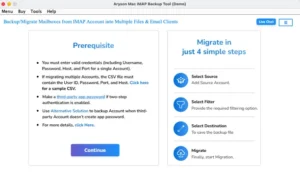
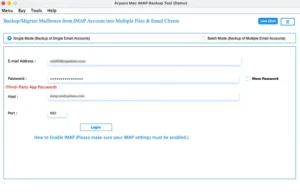
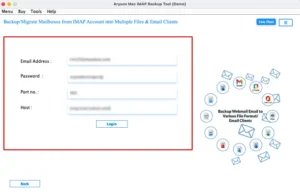
- After that, simply enter your IMAP account credentials to load mailbox data.
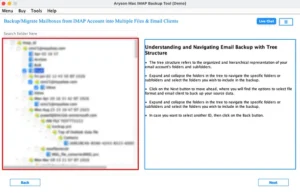
- Now, you need to preview the emails and folders within the software panel.
- In this step, you need to choose IMAP Mail as the destination platform.
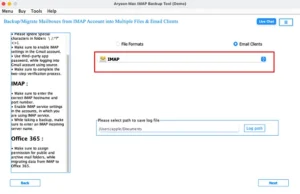
- Thereafter, you have to enter AOL Mail login details & verify the account.
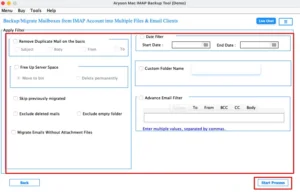
- Finally, apply the required filters and click Start Process for migration.
Note: You can even migrate IMAP to Google Workspace for a business-focused environment or migrate IMAP emails to Zoho Mail for a cost-effective cloud email solution.
Real-Life Scenario James, a consultant based in Chicago, had stored all his important business emails across his multiple IMAP accounts. To simplify email management, he decided to transfer all his data to AOL Mail. His first attempt for the process of conversion via the manual method through Apple Mail, which was difficult to manage. Thereafter, he picked the MacGater IMAP Backup Tool, which transferred all data accurately with zero downtime. Also, the process to migrate IMAP to AOL Mail was completed smoothly, which helped him to continue his work without any issue.
End Note
To wrap up, we have covered the most suitable approaches to move IMAP to AOL Mail for Mac users. Although the manual method can be suitable for your smaller mailbox transfers, it demands careful account configuration. The above-mentioned tool enables a fast and secure migration of your mailbox data to AOL Mail. However, the ideal method totally depends on your mailbox size & technical experience. Likewise, you can choose the right approach that helps you to get a secure and hassle-free migration.
Frequently Asked Questions
Q1. What is the best way to move IMAP to AOL Mail?
Ans: The MacGater IMAP Backup Tool is one of the most reliable options, as it enables direct IMAP to AOL Mail migration with minimal manual effort.
Q2. Can I import IMAP to AOL Mail without losing data?
Ans: Yes, the above-discussed tool preserves email content, attachments, metadata, and folder hierarchy throughout the migration process.
Q3. Is it possible to move multiple IMAP accounts to AOL Mail?
Ans: Yes, the MacGater IMAP Backup Tool supports bulk migration, allowing users to transfer multiple IMAP accounts efficiently.
Q4. Can I move IMAP emails to AOL Mail using Microsoft Outlook?
Ans: Yes, it is possible through a manual method, but it requires account configuration and may take more time compared to using an automated tool.
About The Author:

Abhilash Dogra is a dedicated IT professional with more than 3 years of experience and has been a key member of Aryson Technology for the past 5 years. His expertise includes email migration and data recovery, with a strong focus on technologies such as MS Outlook and Office 365. In addition to this, Abhilash explores front-end technology and software development. He holds a Bachelor's degree in Computer Technology.