-
Written By Abhilash Dogra
-
Updated on May 29th, 2026
How to Import IMAP to Yandex Mail on Mac – Simple Solution
Summary: Mac users often face difficulties when they try to transfer emails from an IMAP account to Yandex Mail. Manual migration methods may result in sync errors, missing emails, or attachment issues during the process. Since Yandex Mail offers secure and easy email accessibility, many enterprises prefer it for centralized mailbox management. In this guide, we will explain a reliable way to import IMAP to Yandex Mail on Mac using the MacGater IMAP Backup Tool to avoid data loss.
IMAP vs Yandex Mail – Which One Should You Choose?
|
Feature |
IMAP Email Account |
Yandex Mail |
|
Accessibility |
Depends on third-party email clients for smooth access. |
Provides direct web-based access from any device. |
|
Email Management |
Multiple accounts can become difficult to organize. |
Offers centralized mailbox management. |
|
Storage Handling |
Storage limits vary according to the email provider. |
Provides reliable cloud-based email storage. |
|
Cross-Platform Access |
Sync issues may occur across different devices. |
Ensures seamless access on Mac, mobile, and browser. |
|
Security Features |
Security depends on the original mail server. |
Includes advanced spam filtering and account protection. |
Outcomes After Choosing the Right Migration Method
- All IMAP emails will appear in the Yandex Mail account.
- Email attachments and formatting will remain preserved.
- Folder structure and mailbox hierarchy will stay maintained.
- The emails can later be accessed in Yandex Mail from Mac systems and other devices.
- Multiple mailbox folders will synchronize properly without data loss.
- The migration process will be completed securely and accurately.
Best Solutions to Import IMAP to Yandex Mail
There are different methods available to complete the IMAP to Yandex Migration process, depending on technical expertise and mailbox size.
- Conventional Approach
- Advanced Solution
Method 01: Manual Approach to Move IMAP Emails to Yandex Mail
In this manual method, an IT administrator can connect their existing IMAP email account directly with Yandex Mail through the built-in mail collection feature. This allows Yandex Mail to synchronize emails from the source mailbox.
Follow the steps for IMAP to Yandex Mail Migration:
Migrating IMAP emails to Yandex Mail helps you move your existing mailbox data into a new account without manual copying.
01 Step: Enable IMAP in the Source Email Account
- Firstly, log in to your existing email account through a web browser.
- After that, open the Account Settings section.
- Now, locate the IMAP/POP settings option.
- Ensure that IMAP access is enabled properly.
- If Two-Factor Authentication (2FA) is enabled, create an App Password for secure login.
02 Step: Log in to Yandex Mail
- Next, open Yandex Mail in your browser.
- Sign in using your Yandex Mail account credentials.
- After that, from the top-right corner, click on the Gear icon.
- Select All Settings from the menu options.
03 Step: Configure Mail Collection Settings
- From the left panel, click on Mail Collector or Import mail from other mailboxes.
- Enter your IMAP email address and password.
- If required, manually provide the IMAP server details:
- Incoming Server
- Port Number
- Encryption Type
- After that, click on the Enable Collector button.
04 Step: Migrate IMAP to Yandex Mail
- Yandex Mail will verify the account credentials.
- Once the connection is established, synchronization will begin in the background.
- Depending on the mailbox size, the migration process may take some time.
- After completion, all imported emails and folders will appear inside Yandex Mail.
Shortfalls: Transfer IMAP to Yandex Manually
- Slow internet can interrupt the email transfer process.
- Big mailboxes usually take a long time to finish syncing.
- Some attachments may not appear correctly after migration.
- Email folders can get interrupted during the transfer.
- IMAP settings can be confusing for non-technical users.
- A few emails might get skipped or duplicated sometimes.
Method 02: Advanced Solution to Import IMAP to Yandex Mail
The MacGater IMAP Backup Tool is a reliable solution to securely import the IMAP emails to Yandex Mail on Mac. The software helps IT admins migrate complete mailbox data while maintaining folder hierarchy, attachments, and email formatting throughout the process. Moreover, it supports bulk migration, which makes it easier to transfer multiple IMAP accounts without complications. Additionally, the software comes with a simple interface that helps even non-technical users complete the migration process smoothly. You may also explore our guide to Migrate IMAP to iCloud for another secure email migration solution.
Quick Steps to Migrate IMAP Emails to Yandex Mail:
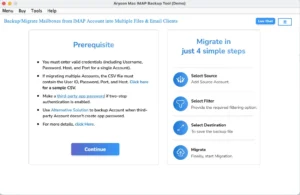
- First, download and launch the IMAP Backup Tool on your system.
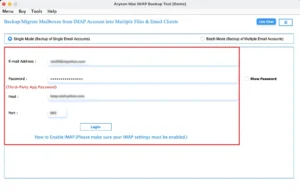
- Enter your IMAP email login details and sign in to the account.
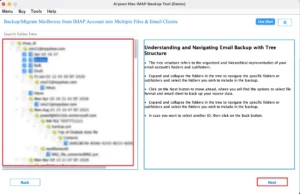
- Then, preview the mailbox folders and choose the emails you want to migrate.
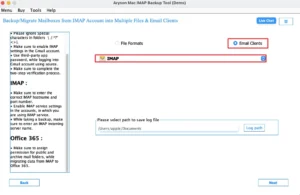
- Now, select IMAP from the available saving options.
- Then, enter your Yandex Mail credentials to connect the account.
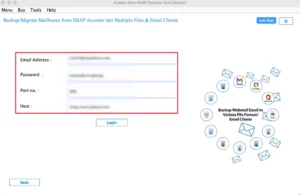
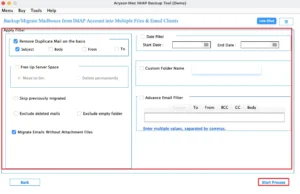
- Finally, apply the needed filters if required and click Start Process.
Note: You can also move IMAP to AOL Mail if you want to access your emails through AOL’s web-based platform for better mailbox management and easier email accessibility across different devices.
Real-Life Scenario
Ethan from Toronto had been using an IMAP email account for client communication and daily work emails. Later, he moved his emails to Yandex Mail on Mac to keep everything in one account. The manual method took a lot of time, and some folders did not sync properly. Then, he tried the MacGater IMAP Backup Tool to transfer emails along with attachments and folder structure easily.
End Note
To sum up, we discussed both manual and professional ways to import IMAP to Yandex Mail on Mac. The manual method can work for small mailbox transfers, but it may become slow and difficult with large amounts of email data. On the other hand, the MacGater IMAP Backup Tool makes the migration process simpler for bulk emails. It also helps maintain folder hierarchy, attachments, and email formatting during the transfer process.
Frequently Asked Questions
Q.1. Which is the safest method to migrate IMAP emails to Yandex Mail?
Ans. The safest method is using the MacGater IMAP Backup Tool, as it helps move emails securely without affecting data, attachments, or folder structure.
Q.2. How can I migrate IMAP to Yandex Mail without losing data?
Ans. You can use Yandex Mail’s Mail Collector feature or the MacGater IMAP Backup Tool. The tool-based method is more stable and reduces the chances of data loss.
Q.3. Can I transfer IMAP to Yandex Mail with attachments and folders?
Ans. Yes, emails, attachments, and folders can be transferred. The MacGater IMAP Backup Tool helps keep everything, including folder hierarchy and attachments, intact.
Q.4. How can I transfer IMAP emails to Yandex Mail securely?
Ans. Use correct IMAP settings or the MacGater IMAP Backup Tool for a safer process. It helps avoid missing emails, sync issues, or data errors.
About The Author:

Abhilash Dogra is a dedicated IT professional with more than 3 years of experience and has been a key member of Aryson Technology for the past 5 years. His expertise includes email migration and data recovery, with a strong focus on technologies such as MS Outlook and Office 365. In addition to this, Abhilash explores front-end technology and software development. He holds a Bachelor's degree in Computer Technology.