-
Written By Abhilash Dogra
-
Updated on May 7th, 2026
How to Migrate IMAP to Google Workspace (G-Suite) – Step-by-Step
Summary: Are you searching for a quick & secure way to migrate your IMAP emails to Google Workspace without compromising any of your data? Most of the users find this conversion difficult, particularly when you work with large mailboxes. So there is a possibility of data inconsistency during the transfer. Proceeding without a structured method can lead to incomplete transfers or missing email data. This guide outlines a practical and reliable solution to migrate IMAP to Google Workspace while maintaining full data integrity. Along with that, we will discuss the MacGater IMAP Backup Tool for easy transfer.
Reasons to Migrate IMAP Email to Google Workspace
There are several reasons why most of the users and organizations choose to move their IMAP emails to Google Workspace.
- Google Workspace provides significantly more storage than standard IMAP servers.
- Moreover, users can easily access their emails and other data from any device at any time.
- Its advanced security features, which include two-factor authentication, help its users keep their data protected.
- Integrated tools such as Google Drive & Meet provide a more efficient approach for team collaboration.
- Likewise, Google Workspace delivers more reliable uptime than standard IMAP setups.
Proven Approaches to Migrate IMAP to Google Workspace
Having a clear understanding of the available methods before you initiate the migration helps in a smooth & more organized process. We will outline the best two approaches here:
- Manual Method
- Automated Method
Approach 01: Manual Method to Migrate from IMAP servers to Google Workspace
This method uses the built-in Data Migration Service that Google Workspace provides in order to transfer your emails directly from an IMAP server. Moreover, it is a cost-free option for individuals or small organizations with a manageable number of emails.
Steps to Move IMAP to Google Workspace:
- Firstly, you have to simply sign in to the Google Workspace Admin Console via your administrator credentials.
- After that, you have to go to Account and simply select Data Migration from the menu.
- Now, you have to choose Email as the migration source and select IMAP as the server type.
- Next, simply enter the IMAP server address and connection details, then click Connect
- Thereafter, you have to select the user accounts and mailbox folders to be migrated.
- Finally, you have to set a migration start date if required and click Start Migration.
Drawbacks of the Manual Method:
- It is time-consuming when you migrate your large volumes of emails via the Admin Console/
- The Data Migration Service limits the number of accounts that can run simultaneously.
- Moreover, your emails older than a certain date may not transfer completely.
- When there is any internet disruption, it can stop the process of migration midway.
- Likewise, users unfamiliar with the Admin Console may find the setup difficult.
Approach 02: Recommended Solution to Migrate IMAP to Google Workspace
The MacGater IMAP Backup Tool is a reliable & purpose-built solution that simplifies the migration of emails from an IMAP server to Google Workspace. It connects directly to the IMAP server and moves all data to Google Workspace without any complications. Moreover, the tool supports bulk migration & enables your large volumes of emails to be processed in a single click. Subsequently, a free demo version is readily available for evaluation. Also, you can explore this step-by-step guide on how to migrate IMAP Emails to Zoho Mail.
Steps to Migrate IMAP to G Suite:
- To get started, you need to install the MacGater IMAP Backup Tool.
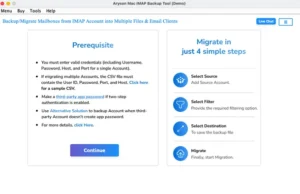
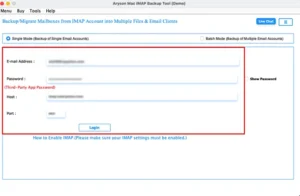
- After that, you have to enter the correct IMAP login credentials >> Sign In.
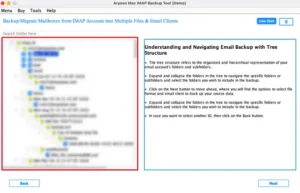
- Now, you have to select the required mailbox folders >> Next.
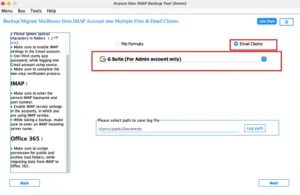
- Then, choose Google Workspace as the output destination from the list.
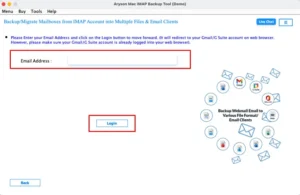
- Provide Google Workspace admin credentials for a secure connection.
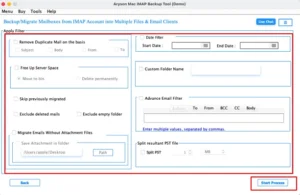
- Apply any additional built-in filters >> click Start Process for migration.
Real-Life Scenario
Michael, a project manager based in Amsterdam, had managed his team communication through an IMAP server for several years. As the organization expanded, the process to handle those emails on a basic IMAP setup became increasingly difficult. So, he decided to shift to Google Workspace in order to get better accessibility & team collaboration. The manual method via the Google Admin Console proved inconsistent, with several folders failing to transfer as expected. Then, he opted for the MacGater IMAP Backup Tool, which transferred all his data to Google Workspace with full accuracy. Moreover, this allows the entire team to resume its operations without any data concerns.
Conclusion
The above blog outlined the various techniques to migrate IMAP to Google Workspace. The manual method is helpful for your basic migration needs, but has certain limitations when the volume of data is substantial. On the other hand, the automated solution provides a more secure option as it handles bulk migration. It also retains the complete folder structure and preserves all attachments. With this, the overall process turned out to be very simple & does not demand any technical expertise.
Frequently Asked Questions
Q.1. Can I migrate emails from any IMAP server to Google Workspace?
Ans: Yes, the above shared IMAP Backup Tool supports migration from most IMAP-enabled email services to Google Workspace while preserving emails, attachments, and folder hierarchy.
Q.2. Is there a free way to migrate IMAP email to Google Workspace?
Ans: Yes, you can use the MacGater IMAP Backup Tool, which offers a simpler migration experience with a free demo.
Q.3. Can I migrate from G Suite (old) IMAP setups to Google Workspace?
Ans: Yes, the MacGater IMAP Backup Tool allows users to migrate emails from old G Suite IMAP accounts to Google Workspace without data loss.
Q.4. Can I migrate multiple IMAP accounts to Google Workspace at once?
Ans: Yes, the MacGater IMAP Backup Tool supports bulk migration, allowing multiple IMAP accounts to be transferred to Google Workspace simultaneously.
About The Author:

Abhilash Dogra is a dedicated IT professional with more than 3 years of experience and has been a key member of Aryson Technology for the past 5 years. His expertise includes email migration and data recovery, with a strong focus on technologies such as MS Outlook and Office 365. In addition to this, Abhilash explores front-end technology and software development. He holds a Bachelor's degree in Computer Technology.