-
Written By Abhilash Dogra
-
Updated on May 21st, 2026
How to Migrate IMAP to Yahoo Mail Fast & Secure Safely
Summary: IMAP is a popular email protocol that lets users access emails across multiple devices while storing data on the server. Yahoo Mail is a cloud-based email service known for its simple interface and reliable storage. Due to configuration differences, direct migration can be difficult. In this blog, we will explain secure methods to migrate IMAP data to Yahoo Mail. Additionally, we will introduce the MacGater IMAP Backup Tool for secure and beginner-friendly migration.
“Hello, I have been using an IMAP email account for years and now want to move all my mailbox data to Yahoo Mail for easier management. Can anyone suggest a safe method to migrate IMAP to Yahoo Mail without losing emails or attachments?” –Amelia Jones, USA
Reasons for IMAP to Yahoo Mail Migration
Users often move IMAP accounts to Yahoo Mail for the following reasons:
- Yahoo Mail offers easy access to emails from any device with an internet connection.
- Users can avoid complex IMAP server management and repeated configuration settings.
- Yahoo Mail provides a simple & user-friendly interface for daily communication.
- It helps users keep their emails securely stored in the cloud for better accessibility.
- Yahoo Mail includes large mailbox storage for managing personal and business emails efficiently.
Top Methods to Migrate IMAP to Yahoo Mail On Mac
There are different ways to move an IMAP account to Yahoo, depending on your technical knowledge and migration requirements. Users can choose either of the following approaches:
- Manual Method
- Automated Solution
Approach 01: Manual Method to Switch from IMAP to Yahoo Mail
The native method involves configuring both the IMAP account and Yahoo Mail account in a desktop email client. After setup, users can manually transfer emails between both accounts.
Steps to Migrate Emails from IMAP to Yahoo:
- Firstly, open Apple Mail or any desktop email client on your system.
- After that, configure your IMAP account using the correct server settings.
- Now, add your Yahoo Mail account using valid Yahoo login credentials.
- Let both accounts synchronize completely so all folders become visible.
- Thereafter, select the emails or folders you want to migrate.
- Drag and drop the selected emails into Yahoo Mail folders.
- Finally, wait for synchronization to complete and verify the migrated emails.
Drawbacks of the Manual Method:
- The migration process is lengthy and includes several manual steps.
- Technical knowledge is required to configure both email accounts correctly.
- Large mailbox migration may take significant time to complete.
- Sometimes, emails fail to sync properly, which may result in incomplete migration.
- This method is not suitable for migrating multiple IMAP accounts simultaneously.
Approach 02: Automated Solution to Migrate IMAP to Yahoo Mail
The MacGater IMAP Backup Tool is a reliable solution to migrate IMAP emails to Yahoo Mail securely. It supports IMAP accounts of all sizes and helps users move IMAP to AOL Mail and other cloud platforms without any data loss. Moreover, the software preserves attachments, email formatting, metadata, and folder hierarchy while offering advanced filters and a free demo version for evaluation.
Simple Steps to Move IMAP Account to Yahoo:
- Firstly, launch the MacGater IMAP Backup Tool on your system.
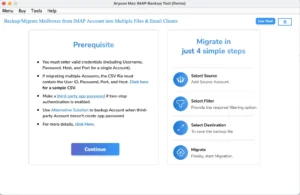
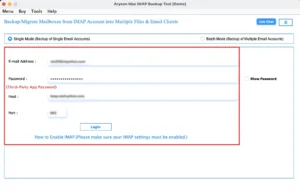
- After that, enter your IMAP account credentials to load mailbox data.
- Now, preview the emails and folders and click Next.
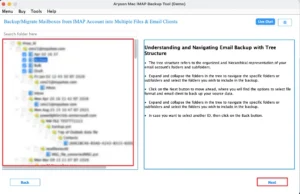
- In the next step, choose IMAP as the destination email platform.
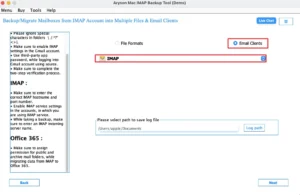
- Thereafter, enter your Yahoo Mail login details for verification.
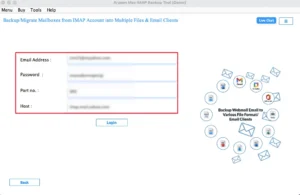
- Finally, apply filters and features and click on the Start Process button.
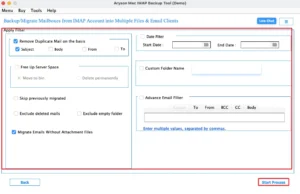
Note: You can also migrate IMAP to Google Workspace for enterprise-level collaboration, secure cloud email management, & enhanced business productivity features.
|
Real-Life Scenario:
David, an accountant from New York, wanted to move multiple IMAP accounts to Yahoo Mail for easier email management. The manual method through Apple Mail became complicated due to sync issues. Later, he used the MacGater IMAP Backup Tool, which securely migrated all his emails and attachments without any data loss. |
End Note
In this blog, we explained the best methods to migrate IMAP to Yahoo Mail. The manual approach is useful for small mailbox transfers, but it requires proper account configuration and technical knowledge. In contrast, the MacGater IMAP Backup Tool helps users migrate IMAP data to Yahoo Mail efficiently while maintaining complete data security. The right method can be chosen according to migration requirements and experience level.
Frequently Asked Questions
Q.1. What is the easiest way to transfer IMAP emails to Yahoo?
Ans: Using the MacGater IMAP Backup Tool is one of the easiest ways to transfer IMAP emails to Yahoo Mail. It simplifies the migration process and securely moves mailbox data without requiring complicated manual configuration steps.
Q.2. How long does it take to migrate IMAP emails to Yahoo Mail?
Ans: Migration time mainly depends on mailbox size, internet connection, and server speed. Smaller mailboxes can be migrated quickly, while larger IMAP accounts containing thousands of emails may require more processing and synchronization time.
Q.3. Are there automated tools to transfer IMAP emails to Yahoo Mail?
Ans: Reliable automated solutions like the MacGater IMAP Backup Tool help users transfer IMAP emails to Yahoo Mail securely. The software automates the migration process while maintaining folder structure, attachments, and complete email data integrity.
Q.4. Can attachments be transferred while moving IMAP emails to Yahoo?
Ans: Email attachments can also be transferred successfully during IMAP to Yahoo Mail migration. Professional migration tools preserve attachments, email formatting, metadata, and mailbox folder hierarchy throughout the complete migration process without data loss.
About The Author:

Abhilash Dogra is a dedicated IT professional with more than 3 years of experience and has been a key member of Aryson Technology for the past 5 years. His expertise includes email migration and data recovery, with a strong focus on technologies such as MS Outlook and Office 365. In addition to this, Abhilash explores front-end technology and software development. He holds a Bachelor's degree in Computer Technology.