-
Written By Abhilash Dogra
-
Updated on March 31st, 2026
Simplest Techniques how to Open MSG to Yandex Mail on Mac
User Query
Michael_T on Mac Forums Ask: I have several MSG files saved on my Mac & want to open them in Yandex Mail, but the platform doesn’t support MSG files directly.
What is the easiest way to access MSG files in Yandex Mail on macOS without losing any emails or attachments?
Emily_R on Stack Exchange Ask: I tried converting my MSG files to EML before importing them into Yandex Mail, but some emails did not appear correctly, and the formatting was affected.
How can I safely move MSG files to Yandex Mail while keeping all attachments and the original email formatting intact?
Summary: Are you looking for a reliable approach to open your MSG files in Yandex Mail on a Mac device? Most enterprises face difficulties when they work with MSG files, particularly on macOS, as this format is not directly supported by the system. As a result, accessing important email data without Microsoft Outlook becomes difficult. In addition, the process to handle emails across different platforms can increase complexity and may lead to data inconsistencies. In this blog, we will walk you through a secure and practical method to access MSG files in Yandex Mail smoothly and without hassle. Along with that, we will cover the MacGater MSG Converter tool for secure conversion.
Reasons to Import MSG to Yandex
In the following section, the main factors behind transferring MSG files to Yandex Mail are explained to help improve accessibility and streamline email management.
- MSG files are not directly compatible with the Yandex Mail platform.
- It allows email access through a web interface without extra tools.
- Moreover, you can bring all your emails into one centralised location.
- Yandex Mail helps to enable easy access across multiple devices.
- Likewise, it helps to improve the overall email organisation and control.
Best Methods to Open MSG to Yandex Mail
There are different options available in order to access your MSG files in Yandex Mail, based on the user’s requirements & level of technical knowledge.
- Conventional Approach
- Advanced Solution
Method 01: Conventional Approach to Import MSG File to Yandex Mail
In this method, you need to convert your MSG files into a supported format. After that, you need to make them accessible in Yandex Mail by proper configuration. Now, you need to simply follow the given steps in order to upload MSG file into Yandex Mail.
Step 01: Add MSG Files into Outlook
- To initiate, you need to open Microsoft Outlook on your system.
- After that, you have to locate the MSG file you want to use.
- Now, drag and drop the file into any Outlook folder, such as the Inbox.
Step 02: Convert MSG Files to EML Format
- You need to open the email from within Outlook.
- After that, click on File and pick the Save As option from the menu.
- Thereafter, select EML as the output format & save the file locally.
- Next, perform the same steps for each MSG file you need to convert.
Step 03: Make Emails Available in Yandex Mail
- You need to log in to your Yandex Mail account using a web browser.
- Open Settings and access the section for mail import or account setup
- If required, you can configure an external email account via IMAP.
- Now, transfer or sync the converted EML files via the connected account.
- Finally, you can review your mailbox to confirm that all emails are accessible.
Limitations of the Manual Method
- The process includes several steps, which makes it time-consuming.
- It is not efficient when you deal with a large number of MSG files.
- Users require Microsoft Outlook in order to complete the conversion task.
- Moreover, there is a risk of losing data or changing the original formatting.
- Subsequently, users require a basic level of technical understanding.
Method 02: Advanced Solution to Open MSG to Yandex Mail
The MacGater Mac MSG Converter is a simple and reliable way to convert your MSG files into compatible formats such as Yandex Mail. Moreover, the tool retains email content & key properties throughout the process. It is also helpful for bulk conversion, which makes it practical for both a few files and large datasets. Likewise, its clean and easy interface helps its users, even with limited technical knowledge, to complete the task with accuracy and minimal effort. You may also walk through our guide to import MSG emails to Zoho Mail for a quick email migration approach.
Easy & Quick Steps to Convert MSG to Yandex Mail:
- Firstly, download & open the MacGater MSG Converter Tool on your Mac.
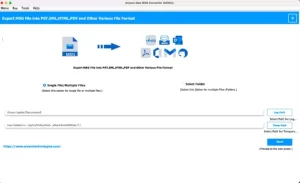
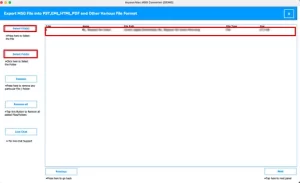
- After that, you can add your MSG files or folders into the software.
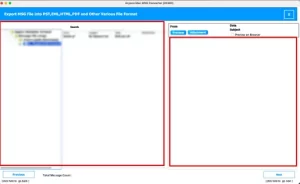
- Now, you need to pick & preview email data before proceeding.
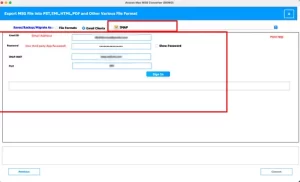
- Now, choose IMAP as output >> enter Yandex Mail credentials.
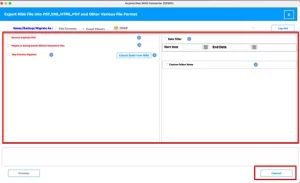
- Use necessary filters >> press Convert to move MSG emails to Yandex Mail.
End Note
In this blog, we have discussed how Mac users can open MSG to Yandex Mail, since these files aren’t supported directly. The manual method works for a few emails but can be slow and includes multiple manual steps. With the tool mentioned above, you can complete the process faster while preserving your email data and attachments. Likewise, if you encounter any issues or need guidance, our support team is available to assist you at every step.
Frequently Asked Questions
Q.1. Why can’t Yandex Mail open MSG files directly?
Ans: Yandex Mail does not support the MSG file format natively, which is primarily used by Microsoft Outlook. MSG files contain specific metadata and formatting that Yandex Mail cannot read without conversion.
Q.2. What are the limitations of Yandex Mail when handling MSG files?
Ans: Yandex Mail cannot import MSG files directly, so users cannot access emails, attachments, or metadata without converting them first. Manual handling can be time-consuming and may result in formatting or data loss.
Q.3. Is there a free tool to open MSG files in Yandex Mail?
Ans: While some free methods exist, they often require multiple manual steps and may not preserve email integrity. A professional tool like the above-discussed utility ensures safe and accurate conversion of MSG files to formats compatible with Yandex Mail.
Q.4. What is the best way to open MSG files in Yandex Mail?
Ans: The most reliable method is using a dedicated conversion tool, such as MacGater Mac MSG Converter, which converts MSG files to EML or other supported formats while keeping attachments and email properties intact.
Q.5. How to view MSG files without Microsoft Outlook for Yandex Mail?
Ans: You can use the above-discussed tool to convert your MSG files into a format that Yandex Mail supports. This allows you to access all emails and attachments without needing Outlook installed.
About The Author:

Abhilash Dogra is a dedicated IT professional with more than 3 years of experience and has been a key member of Aryson Technology for the past 5 years. His expertise includes email migration and data recovery, with a strong focus on technologies such as MS Outlook and Office 365. In addition to this, Abhilash explores front-end technology and software development. He holds a Bachelor's degree in Computer Technology.