-
Written By Abhilash Dogra
-
Updated on February 13th, 2026
Import PST to Yahoo Mail without Outlook – Complete Method
User Query: I want to consolidate all my Outlook emails to one mailbox in Yahoo Mail. How can I import PST to Yahoo Mail without any data loss or corruption?
Overview: PST files are the default files of Microsoft Outlook, because of which, they cannot be accessed on any other email platform other than Outlook. This is what makes it essential for a non-Outlook user to import PST file to Yahoo Mail to access Outlook data anywhere. To help such users with the whole import process, this blog is written. Here you will explore two different methods, including the MacGater PST Converter for quick import.
Why Import PST File into Yahoo Mail?
There are a large number of reasons why a user might want to open PST File in Yahoo Mail. Let us take a look at a few of them:
- To consolidate all Outlook emails in one Yahoo Mail account.
- For effortless email management across multiple platforms.
- To create a centralized backup of important emails.
- For accessing your old emails from your old device on any platform.
- To migrate emails without affecting the attachments or formatting.
Best Solutions to Import PST to Yahoo Mail
There are enough ways to import PST files to Yahoo Mail. Among those methods, here we will study the two most effective ones in detail.
- Manual Approach
- Automated Solution
Solution 1: Transfer Outlook PST Files to Yahoo Mail using Outlook
It might seem a difficult task to import PST files to Yahoo Mail, but it becomes easier if performed correctly. To manually import your Outlook PST data into Yahoo, you first have to make sure that your Yahoo Mail account is connected to MS Outlook. Once the accounts are linked, follow these steps:
- Open the Microsoft Outlook application on your system.
- Click on File in the top-left corner, then choose Open & Export.
- Select Import/Export and click Next.
- Choose Import from another program or file and click Next again.
- Pick Outlook Data File (.pst) as the file type and click Next.
- Hit the Browse button to locate your PST file on your computer.
- Choose the option that fits your import preferences, then click Next.
- Select your connected Yahoo email from the drop-down menu, and finally, click Finish to upload PST to Yahoo Mail.
Cons of Performing the Manual Import
- This method can be very time-consuming for large PST files and mailboxes.
- Improper execution of the import process may lead to data loss or corruption.
- This approach requires you to install MS Outlook on your system.
- Repeated imports may lead to duplication of emails.
- It might be difficult for a beginner to perform the technical steps.
Solution 2: Automated Software to Import PST to Yahoo Mail
MacGater PST Converter is the quickest software designed to import Outlook PST files into Yahoo Mail while keeping the emails, attachments, and original formatting intact. Other than Yahoo Mail, it can also import PST to iCloud, Thunderbird, IMAP, Hotmail, and various other email platforms. Moreover, it keeps the original folder structure intact during import. Also, it offers various built-in features and a user-friendly interface. This allows even beginners to effortlessly preview and import their PST files.
Steps to Import PST Files to Yahoo Mail are as follows:
- Install & open the MacGater PST Converter on your existing system.
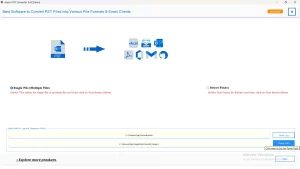
- Then, click Select Files/Folders to import your PST files.
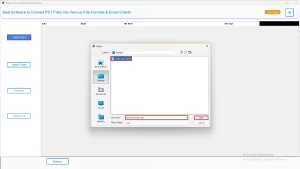
- After that, expand the folder tree, select the emails you want to convert, & preview them if needed.
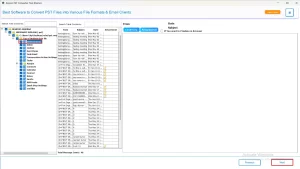
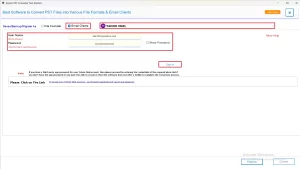
- Now, select Yahoo Mail as the desired email client and log in to it.
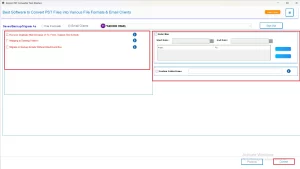
- Apply the additional filters according to your requirements & hit Convert.
Conclusion
In order to get better accessibility, backup, and management of Outlook data, users nowadays prefer to import PST to Yahoo Mail. Users can do the same with the help of either the manual method or the automated method as per their volume of PST files. The automated solution works well for a large number of files or bulky mailboxes. Whereas, the manual method is considerable only in case of fewer PST files.
Frequently Asked Questions
Q.1 Can I open PST files directly in Yahoo Mail?
Ans. No, you can’t open PST files in Yahoo Mail as it doesn’t support the PST file format.
Q.2 What’s the best way to upload a PST to Yahoo Mail?
Ans. The best way to import Emails from PST to Yahoo Mailbox, is by using MacGater PST Converter.
Q.3 Will importing a PST file to Yahoo Mail delete any existing emails?
Ans. No, importing a PST file to Yahoo Mail will not delete any existing emails.
Q.4 Can I import emails from PST to Yahoo Mailbox manually?
Ans. Yes, you can use manual methods for importing a PST file to Yahoo Mail, but it might lead to data loss and corruption.
About The Author:

Abhilash Dogra is a dedicated IT professional with more than 3 years of experience and has been a key member of Aryson Technology for the past 5 years. His expertise includes email migration and data recovery, with a strong focus on technologies such as MS Outlook and Office 365. In addition to this, Abhilash explores front-end technology and software development. He holds a Bachelor's degree in Computer Technology.