-
Written By Suman Rawat
-
Updated on April 29th, 2026
How to Convert PST to CSV on Mac Without Outlook
Summary: Working with email data on a Mac can become difficult when you deal with two very different formats, like PST and CSV. PST files are created by Microsoft Outlook and are built in order to store your entire mailbox, which includes the emails & calendars in a structured way. In comparison, CSV files are much simpler & widely accepted, which helps you to easily open & edit the data across different applications. The real issue arises because macOS doesn’t directly support PST files, so most of the users can’t access their data. Therefore, in this blog, we will discuss the most effective solutions to convert PST to CSV on Mac. We will also introduce the MacGater Outlook PST Converter for an error-free migration.
Why Do Users Export PST to CSV?
There are various reasons listed below that help you to decide whether you need this conversion or not:
- Mac doesn’t support the process to directly open your PST files.
- CSV files can be accessed without installing Outlook.
- Moreover, your data can be viewed quickly in a simple table format.
- Users can easily move their contacts to other apps or services.
- While you use the CSV, you don’t need extra software to check basic data.
Secure Approaches to Convert PST to CSV on Mac
To get PST data into a CSV format on a Mac, users usually rely on the given techniques based on their needs & convenience.
- Manual Method
- Automated Solution
Approach 01: Manual Method for PST to CSV Conversion
This approach uses a step-by-step procedure in order to access your PST data & save it in CSV format. In this way, you can handle and extract your data via the available system options.
Quick Tutorial to Convert PST Contacts to CSV:
- Firstly, open Outlook on your Mac & make sure the PST file is already added.
- After that, you have to go to the File menu and choose the Export option.
- Now, you have to simply select the type of data you want to export.
- You need to choose CSV as the file format or export in a compatible format.
- Thereafter, select the destination location where the file will be saved.
- Then, you have to review the settings and confirm the export process.
Drawbacks of the Manual Method:
- The process can be time-consuming as you need to follow several steps.
- It is not completely workable on Mac without using an additional setup
- Some amount of your data may not transfer properly during the process.
- There is limited flexibility when you choose specific data fields.
- Moreover, certain steps might be complex for non-technical users.
- Likewise, there is a possibility of mistakes while you manage file formats.
Approach 02: Automated Solution to Convert PST to CSV on Mac
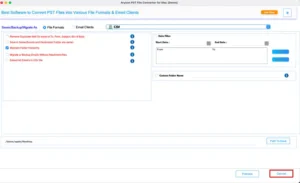
MacGater Mac PST Converter is an easy-to-use utility that is built to help Mac users convert their PST files to a wide range of formats. Moreover, the built-in Folder Hierarchy feature makes sure that the original structure remains intact after conversion. Likewise, users can even preview mailbox content before the process of export, which gives them full control over the process.
Steps to Convert PST File to CSV on Mac without Outlook:
- Firstly, you have to run the MaGater Outlook PST Converter on your Mac.
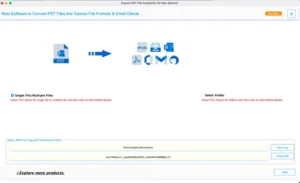
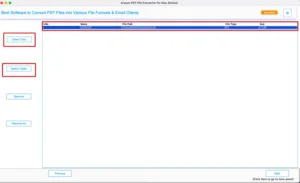
- Use the Select File or Select Folder option to load the PST file to convert.
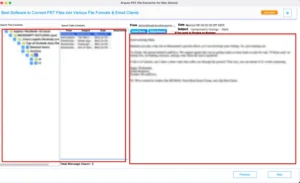
- After that, browse through your mailbox folders & preview the contents.
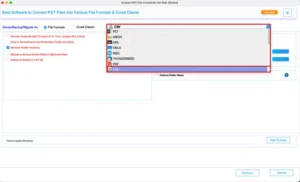
- From the saving format drop-down menu, pick CSV as your output format
- Then, set any filters if needed, and choose where you want the file saved.
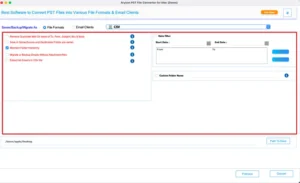
- Finally, you have to hit the Convert button to convert Outlook PST to CSV.
Pro Tip: The process to convert PST to MSG can be helpful when you want to work with individual emails separately.
Manual vs Tool-Based Conversion: A Quick Comparison
|
Aspect |
Manual Method |
Automated Solution |
|
Steps Involved |
This includes several steps for completion. |
Users need to follow a quick and guided process. |
|
Time Consumption |
It takes a considerable amount of time for export. |
This solution saves your time with faster processing. |
|
User Experience |
It may get complicated for new users. |
It seems to be Simple & easy to handle. |
|
Support on Mac |
This is not fully suitable for Mac users |
It is designed to work smoothly on Mac. |
|
Data Safety |
In this, there is a chance of data loss or missing items |
This utility helps you to keep your data complete and intact. |
|
Requirement |
It needs Outlook or extra steps. |
When you use this software, you don’t need Outlook for export. |
End Note
In the above blog, we have covered various techniques to convert PST to CSV on Mac. The manual method is usually suitable for smaller tasks, but it includes several steps and certain drawbacks, as mentioned earlier. In contrast, an automated solution provides a more direct & time-saving way to complete the export. However, the choice mainly depends on individual needs, but for a quicker experience, you can use a dedicated solution, which is considered a more reliable option.
Frequently Asked Questions
Q.1. Is it possible to export PST contacts to CSV on Mac?
Ans: Yes, but not directly with Mac Outlook. The MacGater Outlook PST Converter makes it easy to export contacts into CSV format.
Q.2. Can I convert PST to CSV for free on Mac?
Ans: You can use a free demo to preview and convert limited data. Full conversion usually requires the paid version.
Q.3. Does Mac Outlook support PST to CSV conversion?
Ans: No, Mac Outlook doesn’t offer direct PST to CSV conversion. It only supports other export formats.
Q.4. Why do I need to convert PST File to CSV on Mac?
Ans: CSV makes your data easier to open, edit, and share using tools like Excel or Google Sheets.
About The Author:

Suman Rawat is a technical content writer and expert in the fields of email migration, data recovery, and email backup. Her passion for helping people has led her to resolve many user queries related to data conversion and cloud backup.