-
Written By Abhilash Dogra
-
Updated on March 24th, 2026
How to import msg to AOL Mail – Quick & Easy Guide
Summary: How can Mac users access their MSG files in AOL without losing their email content or attachments? MSG files are created by Microsoft Outlook and are used to store your individual email messages. Yet, on macOS, the process to access files becomes difficult as AOL Mail is a web-based email service that does not directly support this file format. Due to this difference, most Mac users need a proper solution to make their MSG data accessible in AOL Mail. Along with that, we will outline how a Mac MSG converter tool simplifies the entire process.
TL; DR: Professionals import their MSG files into AOL Mail for secure transfer and easier email management. This can be done manually using Outlook on Mac via IMAP configuration or with the help of the Mac MSG Converter Tool for more accurate migration.
Reasons to Convert MSG to AOL Mail
This conversion helps to improve accessibility and simplifies email management across multiple devices, along with other reasons:
- You can access emails anytime through a web-based AOL Mail account.
- AOL Mail helps to keep all your email data organized in one platform.
- Likewise, users can view MSG emails without Microsoft Outlook.
- Moreover, you can share and forward emails easily from a single account.
- Besides, you can manage multiple MSG files without local storage limitations.
Recommended Ways to Import MSG to AOL Mail
There are several ways to import your MSG emails into AOL Mail, which depend on the number of files and your technical knowledge.
- Conventional Method
- Automated Solution
Way 01: Conventional Method to Upload MSG file into AOL Mail
For Mac users with a limited number of MSG files, this approach uses an email client configured with AOL Mail via IMAP. Since Outlook for Mac does not directly import MSG files, you need to first access them through Outlook and then sync them in AOL Mail.
Step 01: Set Up AOL Mail in Outlook for Mac
- To begin, you need to open Outlook for Mac on your system.
- After that, you need to go to Tools > Accounts and add a new account.
- Now, you have to enter AOL Mail credentials >> configure by IMAP settings.
- At this step, let Outlook finalise the account setup and update all folders.
Step 02: Access and Prepare MSG Files
- Thereafter, you have to make sure that your MSG files are accessible on your system.
- After this, you need to import the MSG files into Outlook via drag-and-drop.
- Create a new folder in Outlook in order to move the required emails into it.
Step 03: Upload Emails to AOL Mail
- Drag the prepared emails from the local folder to AOL Mail in Outlook.
- Thereafter, you need to wait for synchronization to complete.
- At last, log in to AOL Mail via a browser to verify that emails are uploaded.
Limitations of the Conventional Method
- It is not suitable for large volumes of MSG files due to time consumption.
- In this method, an incorrect IMAP setup can prevent proper email transfer.
- Moreover, email formatting or attachments may not remain intact.
- During the process, manual handling can increase the chance of errors.
- Also, setting up and handling accounts requires basic technical expertise.
Way 02: Automated Solution to Import MSG to AOL Mail
The Mac MSG Converter Tool is the fastest and most secure way for Mac users who want to import their MSG files into AOL Mail without any complex configuration. Moreover, it is helpful in bulk email transfer and maintains attachments and folder structure. Users can directly upload their MSG files to IMAP-supported services, such as AOL Mail, with ease. Likewise, the tool has useful features such as email preview and filter options, which make it suitable for both individuals and enterprises. You can easily open MSG file in EMLX with the help of the same utility.
Steps to Import MSG files into AOL Mail:
- To start, you need to install the Mac MSG Converter Tool on your system.
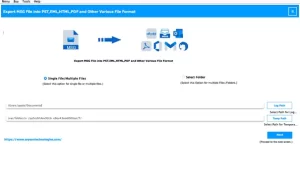
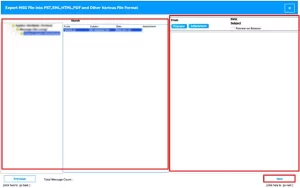
- After that, you need to add MSG files or folders from your system.
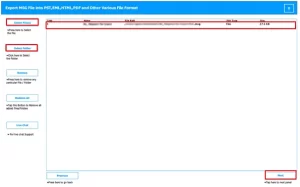
- Next, you can preview emails and attachments before migration.
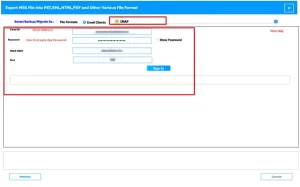
- Thereafter, choose AOL Mail (IMAP) and enter your login details.
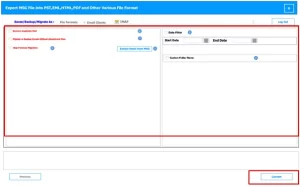
- Then, apply filters as needed >> Convert to migrate MSG files to AOL Mail.
End Note
To conclude, we have discussed both the manual and professional ways to import MSG to AOL Mail on macOS. The conventional method works for a few emails but can be time-consuming and requires technical setup. The advanced tool provides an accurate solution for bulk migration and helps to keep the attachments and folder structure intact. With its features such as email preview and selective transfer, this tool helps both individual users and enterprises to manage their MSG files. Moreover, for any assistance, you can contact our support team for expert guidance.
Frequently Asked Questions
Q.1. Is there a free method to convert MSG files to AOL Mail?
Ans: There is no fully reliable free method for bulk MSG file transfer. Manual methods exist but are limited, time-consuming, and may risk data loss. The Mac MSG Converter Tool provides a secure, accurate, and efficient solution for both small and large volumes of MSG emails.
Q.2. How to transfer MSG files into AOL Mail without Outlook?
Ans: You can use the Mac MSG Converter Tool, which allows direct import of MSG files to AOL Mail without requiring Microsoft Outlook. The tool maintains attachments, metadata, and folder structure during migration.
Q.3. Can I upload MSG files directly into AOL Mail?
Ans: No, AOL Mail does not support direct MSG file import. Using a professional tool like Mac MSG Converter enables a smooth transfer to AOL Mail through IMAP, ensuring email content and attachments remain intact.
About The Author:

Abhilash Dogra is a dedicated IT professional with more than 3 years of experience and has been a key member of Aryson Technology for the past 5 years. His expertise includes email migration and data recovery, with a strong focus on technologies such as MS Outlook and Office 365. In addition to this, Abhilash explores front-end technology and software development. He holds a Bachelor's degree in Computer Technology.