-
Written By Abhilash Dogra
-
Updated on November 25th, 2025
Best method to Convert PST to EML Without Outlook
Summary: When you manage your email, it can get complicated when you’re trying to transfer data between email services. For example, Outlook stores your mailbox data in PST data files, which are designed for Microsoft Outlook only. Whereas EML files can be accessed from several email clients, including Thunderbird, Windows Live Mail, and Apple Mail. If you’re trying to access your Outlook email from another platform, the best option is to convert PST files to EML files. This blog post will cover the reasons to convert PST to EML files, how to do it manually, and how to use the MacGater PST Converter Tool, which does not require Outlook.
Why Do You Need to Convert a PST File to EML?
Users and businesses alike have some reasons for preferring PST to EML export:
- More Compatible: PST files are proprietary to Outlook, while EML files can be opened by many other email clients.
- Easier to Get Access To: Every EML file contains a saved email, making it easy to share, back up, and organize.
- More Secure: PST files often become corrupted because they are updated and can be notoriously large. Making smaller EML files protects your data.
- Legal & Business Use: Professionals may only need the specific messages rather than the entire archived data. EML allows for easy access to specific preservation.
How Can I Convert Outlook PST to EML File Manually?
Some manual methods can be utilized; however, most will require that Outlook be installed on your machine. We will examine them one at a time.
Approach 1: PST to EML Conversion with Outlook for Mac
This first method can only be done if you have Outlook for Mac installed.
- Firstly, open Outlook on your Mac and sign in to your account.
- Next, import your PST file into Outlook.
- Once the PST file is imported, you can drag emails onto the desktop.
- The emails will be saved in the .eml format automatically.
Approach 2: Export PST to EML by Syncing with Gmail
Another method is to sync your PST file to Gmail and then use Thunderbird to export EML.
Enable IMAP access in your Google account: Go to Settings > Forwarding and POP/IMAP > and tick the enable IMAP option
- In Outlook, set up your Google account via IMAP.
- Next, add your account to Outlook.
- In Outlook, import your PST file.
- Use Outlook to move your email to the Gmail folders.
- Finally, you will export the email from Thunderbird
Limitations: You will only want to use this method for small PST files. Managing larger PST files or multiple PST files using this method will be cumbersome and prone to errors.
Approach 4: Easily Convert PST to EML Without Outlook
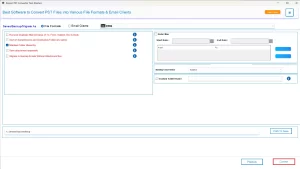
The MacGater PST to EML Converter is an easy and effective application that allows users to convert their PST files to EML files quickly and easily. Users can export all data from the Outlook mailbox with the original folder hierarchy and data integrity in place. This utility can make sure that there is no risk of data loss. It is software that can give users one of the easiest ways for the conversion. Additionally, users can also convert PST to PDF and all other file formats as well.
How to convert a PST file to EML using the converter tool:
- First, download and install the PST to EML Converter on your system.
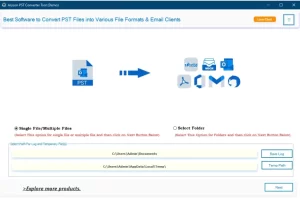
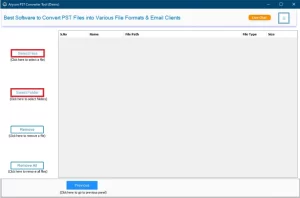
- Next, add your PST files by choosing either the Single File or Folder mode.
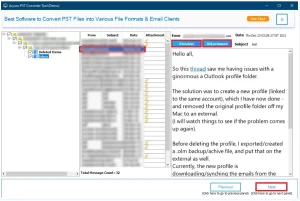
- After that, preview all your emails to make sure everything is in place before conversion.
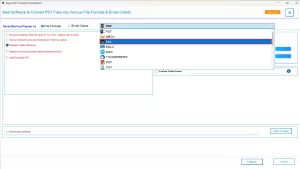
- Then, select EML as your desired conversion format.
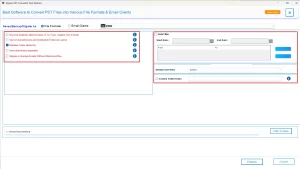
- If needed, apply filters such as the duplicate remover to refine your results.
- Finally, click on convert to convert PST File to EML File.
Conclusion
In this article, we have discovered some of the manual approaches, such as IMAP sync and Thunderbird, that can help you convert PST to EML. They are often slow, confusing, and impractical for bulk migration. The above-mentioned applications allow you to migrate from PST to EML files without Outlook installed. Users can also move their EML files completely securely and accurately with no data loss.
Frequently Asked Questions
Q.1 Are EML files compatible with other email clients after conversion?
Ans. Yes, EML files can be easily opened in Thunderbird, Windows Live Mail, Apple Mail, and several other email platforms.
Q.2 What is the best method to convert PST to EML without Outlook?
Ans. The most reliable way is to use the MacGater PST to EML Converter tool, which works even without Outlook installed.
Q.3 Is PST to EML conversion safe for sensitive email data?
Ans. Yes, if you use Macgater Converter, it can make sure that there is no loss of attachments, formatting, or metadata.
Q.4 Can I batch convert PST files to EML?
Ans. Yes, MacGater PST to EML Converter supports bulk conversion. Making it suitable for businesses and users with large data files:
1. Download and install PST to EML Converter.
2. Browse and select your PST files for the software.
3. In the Advanced panel, preview your emails before conversion.
4. From the options, choose EML as the conversion format.
5. Add any filter needed from the filters given on the screen.
6. Select the destination of the folder to export.
7. Click on Convert to start the process of conversion.
About The Author:

Abhilash Dogra is a dedicated IT professional with more than 3 years of experience and has been a key member of Aryson Technology for the past 5 years. His expertise includes email migration and data recovery, with a strong focus on technologies such as MS Outlook and Office 365. In addition to this, Abhilash explores front-end technology and software development. He holds a Bachelor's degree in Computer Technology.