-
Written By Suman Rawat
-
Updated on July 30th, 2025
How to Import MBOX to Hotmail Easily: A Complete Guide
Summary: Emails are essential for professional communication, and many users prefer Hotmail to manage their inbox. However, it is difficult to open MBOX files using Hotmail because Hotmail does not directly support the MBOX format. This blog shares simple yet effective ways to import MBOX to Hotmail without hassle. It includes both manual and automated methods to suit different needs. For better accuracy and speed, a professional MBOX Converter Tool is highly recommended.
Reasons to Import MBOX File to Hotmail
Here are some key reasons to import MBOX files to Hotmail:
- View all your emails together in one centralized mailbox format.
- Hotmail’s cloud-based access ensures availability from any device.
- Safely back up your data on Microsoft’s secure servers.
- Benefit from advanced spam filters and security features.
- Gain seamless access to Office 365 tools via Outlook integration.
Ways to Import MBOX to Hotmail
You can import MBOX files to Hotmail by using:
- Manual Method
- Professional Tool
Read the following section to accomplish the task easily.
Manual Method to Open MBOX File in Hotmail
Hotmail does not natively support MBOX files. However, there is a way to manually import your MBOX file into Hotmail.
- Launch the Mozilla Thunderbird application and log in with your account.
- After that, go to the settings and the Add-ons and Themes option.
- Then, search for ImportExportTool NG and install it.
- Next, choose the ImportExportTool NG option and import the MBOX file.
- After that, go to the settings and select the Add Mail Account option.
- Here, enter the Hotmail account credentials to configure it.
- Then, choose the desired MBOX file that you want to transfer.
- Drag and drop all the desired MBOX files into Hotmail.
- In the end, make sure all your data is successfully imported.
Challenges to Upload the MBOX File into Hotmail Manually
Several limitations are associated with the migration of the MBOX file into Hotmail. Some of them are mentioned below:
- Hotmail does not natively support MBOX files.
- For a large dataset, it takes time.
- There is a possibility of data loss and corruption.
- Sometimes, attachments do not migrate perfectly.
- It required some technical knowledge to accomplish it.
Sophisticated Method to Import MBOX to Hotmail
If you want to mitigate all the limitations of the manual method, consider the professional MBOX Converter Tool. It easily bypasses all the limitations and provides a smooth experience. Moreover, it can also import MBOX to Zoho Mail and other distinct email clients. This tool is so easy to operate, as it requires negligible technical knowledge to operate. The best part of this tool is that it saves your data throughout the process. Download now and leverage the facility of data migration.
Simple Steps to Import MBOX Emails to a Hotmail Account
- Download and install the MBOX Converter Tool on your system.
- After that, choose the Select File or Select Folder option.
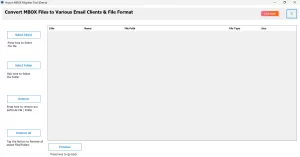
- After that, browse and select the desired MBOX file from your system.
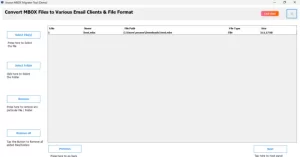
- Next, preview it using the tree-like structure and select the desired mail.
- Then, under the Email Clients, choose the Outlook 365 option.
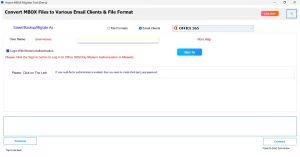
- Here, enter the Outlook credentials to authenticate yourself.
Conclusion
In summary, both methods are sufficient for importing MBOX files into Hotmail, depending on your needs and technical comfort. The manual methods are effective, but they take time. If you are dealing with small data, the manual process is easily done. However, for bulk transfers, using a professional tool is a smarter choice. It ensures data security and simplifies the entire process. Even novice users can import MBOX to Hotmail without assistance.
Frequently Asked Questions
Q.1 Can I directly import MBOX files into Hotmail?
Ans. Yes, you can directly import your desired MBOX data into Hotmail. For this, utilize the professional MBOX Converter Tool on your system.
Q.2 Which tool is best for importing MBOX files to Hotmail?
Ans. The MacGater MBOX Converter Tool is the best tool to import your desired MBOX file into the Hotmail application. It easily imports your desired data and provides better experiences.
Q.3 Will I lose emails or attachments during MBOX to Hotmail import?
Ans. If you apply the manual method to accomplish the task, there is a chance of data loss and corruption. However, if you utilize the professional method, you can not lose a single bit of data.
Q.4 How can I convert MBOX files to a format compatible with Hotmail?
Ans. To convert MBOX files into a format compatible with Hotmail, you can use a professional MBOX Converter Tool. This software converts MBOX files into PST or directly imports them into Outlook. Alternatively, you can export MBOX emails using email clients like Thunderbird, then transfer them to Outlook configured with your Hotmail account.
About The Author:

Suman Rawat is a technical content writer and expert in the fields of email migration, data recovery, and email backup. Her passion for helping people has led her to resolve many user queries related to data conversion and cloud backup.