-
Written By Abhilash Dogra
-
Updated on November 25th, 2025
How to Import EML to IMAP Server Easily
User Query: I used to store all my data in EML file format for years of emails on my computer. Now, I am trying to switch to IMAP and want that data on my phone and laptop. Data can also be used from Gmail. Can someone tell me a quick way to import EML to IMAP server without losing any data or attachments?
Summary: The EML file format is used for saving individual messages with the same headers and attachments. EML files are mostly used for archiving or sharing, but they are not practical for daily email management. In this blog, we will see the usage of MacGater EML Converter for solving the problem of conversion. Some users may use the manual method for importing a small amount of data they have.
Some reasons why people want to import EML to IMAP include:
- IMAP can store your emails on the server and sync them across different devices. You can access your data anywhere, anytime.
- There is no need to manage hundreds of individual files scattered across folders.
- Emails are backed up on the server instead of being limited to a single machine.
- When you organise and search for emails becomes easier when they are inside an IMAP account.
How Do We Import EML Files into IMAP Servers?
There are several approaches: manual methods using email clients and a recommended utility. Let’s check every approach one by one.
Method 1: Configure and Import EML Emails to IMAP through MS Outlook
Microsoft Outlook is one of the most popular email clients to date. If your IMAP account is already configured in Outlook, you can easily import EML emails all by yourself.
- Firstly, launch Microsoft Outlook.
- Simply configure your IMAP account in Outlook.
- Now, locate the folder containing EML files you wish to use.
- Just drag and drop your desired EML files.
- Finally, Outlook will start syncing all your EML files with the IMAP server.
Cons of this approach:
- Drag-and-drop becomes very tiring for thousands of emails.
- Folder hierarchy and formatting cannot always be preserved.
- Bulk imports may freeze Outlook or sometimes cause delays.
Method 2: Open and Import EML File into IMAP Server Using Windows Live Mail
Though discontinued, Windows Live Mail was once widely used. Some users still rely on it to import EML emails.
- Firstly, run the Windows Live Mail email client and set up your IMAP account.
- Choose Windows Live Mail format as the file type.
- From the available list, proceed by choosing Windows Live Mail as the File Format.
- Browse and select the EML files to import them.
- Lastly, after the import is completed, move those emails into the IMAP account folders.
Method 3: EML to IMAP Migration via Thunderbird
Thunderbird is an open-source email client. It can handle EML imports with the help of an extension and upload them to IMAP servers.
- Firstly, download and install Thunderbird.
- Add your IMAP account to Thunderbird.
- Install the ImportExportTools NG add-on.
- Now, just Right-click on your IMAP folder.
- Choose the Import EML files option there.
- At last, select the files or folder to upload.
Disadvantages:
- Performance issues with very large EML collections.
- Requires add-on installation.
- For users with technical knowledge.
Why Manual Methods Are Not Enough
Manual approaches can work for the small files, but they come with some challenges:
- It can take long hours when you have emails in bulk.
- Data loss can be the most common issue for manual methods.
- Broken folder structure if the client does not handle hierarchy properly.
- Issues with Compatibility with outdated software.
Method 4: Smart Solution to Import EML to IMAP with Ease
MacGater EML Converter is a recommended utility that can be a reliable solution to eliminate the complexity of manual setups. It is designed to handle bulk data while preserving the structures of the folder and directly connecting with IMAP servers. It is built for simplifying EML to IMAP migration with minimal effort. You can also utilize the filters available in the software to increase your work efficiency. Also offers to import EML files into Yahoo Mail
Simple steps for the migration:
- First, install and open the MacGater EML Converter on your computer.
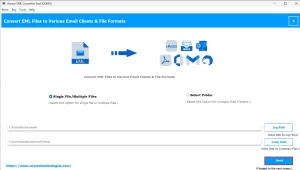
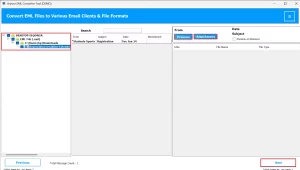
- Now, press the Add Folder option and select the folder containing your desired EML files.
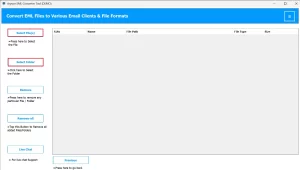
- You can always preview the imported selected file.
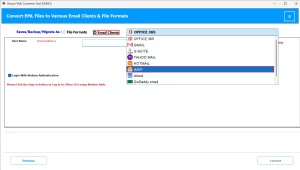
- Simply, from the saving options, choose IMAP.
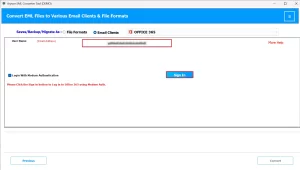
- Enter your valid IMAP account credentials.
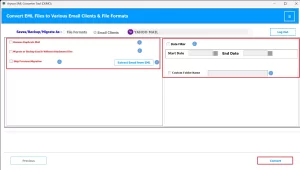
- Lastly, click Start to upload EML Files to IMAP.
Practical Example:
|
When a business has 20,000 archived emails in EML format from any previous client. Now, wanting to access them locally is not possible, and manually importing them would take weeks. With the above-mentioned utility, they can migrate the entire archive to an IMAP account within a few hours, keeping all folders intact. |
Conclusion
Mostly, Users search for ways to import EML to IMAP when they move from local email storage to cloud-based services. The above-mentioned can work better for small data sets. For bulk migrations, use a tool like MacGater EML Converter, which is the best choice. It saves time, ensures folder integrity, and reduces the risk of losing data. The goal is easy accessibility, reliability, and future-proof email storage.
Frequently Asked Questions
Q.1 Can I import EML files directly into an IMAP server?
Ans. No, IMAP servers do not accept EML files directly. You must use an email client or a tool like MacGater EML Converter.
Q.2 What tools can I use to import EML to IMAP?
Ans. The MacGater EML Converter is one of the best tools used for the conversion.
Steps to follow:
1. Install and open MacGater EML Converter.
2. Click Add Folder and select the folder containing EML files.
3. From the saving options, choose IMAP.
4. Enter your IMAP account details, like email ID and password.
5. Click Start to upload EML Files to IMAP.
Q.3 Will importing EML files to IMAP affect my current emails?
Ans. No, if you use the MacGater EML Converter tool, your existing IMAP emails stay untouched. Imported emails are added alongside them.
Q.4 Is folder structure maintained during EML to IMAP migration?
Ans. Yes, professional tools like MacGater EML Converter preserve folder hierarchy, while manual methods may not always maintain it.
About The Author:

Abhilash Dogra is a dedicated IT professional with more than 3 years of experience and has been a key member of Aryson Technology for the past 5 years. His expertise includes email migration and data recovery, with a strong focus on technologies such as MS Outlook and Office 365. In addition to this, Abhilash explores front-end technology and software development. He holds a Bachelor's degree in Computer Technology.