-
Written By Abhilash Dogra
-
Updated on November 25th, 2025
Convert EML to PDF Quickly and Easily
Summary: Users tend to save emails in the EML format as easily accessible and backed up on multiple devices or platforms. Eventually, EML files can become inaccessible, obsolete, or corrupted, causing potential data loss. Converting EML files to PDF is a more stable and preferred option for improved security and long-term accessibility for improved safety and security. PDF is a widely accepted format that is renowned for its compatibility, stability, and readiness to comply. In this blog, we will discuss simple methods to convert EML to PDF. We will also recommend a professional EML Converter for batch conversion of EML files.
Reasons to Convert EML File to PDF
Below are the main reasons why individuals and organizations choose to convert .eml files into .pdf format:
- A PDF file can be easily opened on every device without any software.
- It saves the exact formatting of the mail for easier accessibility.
- PDF files are ideal for long-term compliance and archiving purposes.
- You can also protect your PDF file with password encryption.
- The PDF file supports cross-platform compatibility and bypasses OS restrictions.
Manual Method to Convert EML to PDF
Microsoft Outlook provides a built-in option of the “Print.” You can use the Print option to save the EML file as a PDF. Follow the steps to accomplish the task manually.
- Type the Windows + E button to open the File Explorer application.
- Browse and select the desired EML file from your local drive.
- Double-click on it to open it with the MS Outlook application.
- After that, click Ctrl+P simultaneously to open the Print option.
- Here, choose the Microsoft Print to PDF option.
- Next, apply the filters and functionalities to enhance the output.
- After that, browse and select the desired location to save the resultant file.
- In the end, make sure your PDF is accessible.
Professional Method to Convert EML to PDF
Converting EML to PDF by using an EML Converter is an efficient and guaranteed solution. It facilitates bulk conversion and enables users to deal with large numbers of files seamlessly. Moreover, the software features sophisticated options like data preview, exclusion of duplicate emails, and a user-defined date filter. In addition to EML to PDF conversion, it also supports the conversion of EML files to PST, MBOX, and MSG. Additionally, its simple interface provides easy running and quick operation. The software supports all the latest as well as previous versions of Windows operating systems.
Steps to Export EML to PDF
- Download and install the EML Converter Tool on your system.
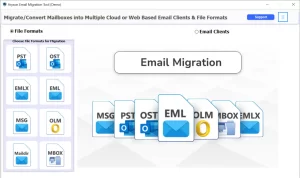
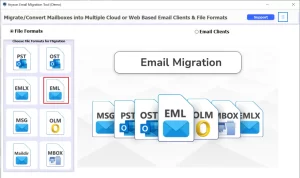
- After that, click on the file format and choose the desired EML file.
- After that, click on the Select file option to browse the EML file.
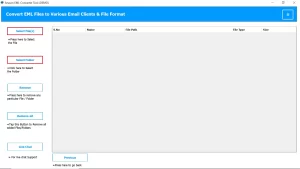
- Then, preview the content and select the desired mailbox to convert.
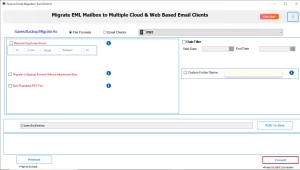
- Under the file format, choose the PDF option as output.
- Then, apply the necessary filters and functionalities.
- In the end, browse and select the saving location and click on Convert.
Conclusion
Converting your EML file into PDF keeps your email safe and secure. It helps you to access your data from any device and anywhere. You can accomplish your task by using a manual method or a professional method. Choose the method that can convert EML to PDF and suits your comfort and ease of work.
Frequently Asked Questions
Q.1 What is an EML file?
Ans. An EML file is a saved email message that contains the full content of an email, including the subject, sender, recipient, and any attachments. It’s commonly used by email programs like Outlook, Thunderbird, and Windows Mail to store and share individual emails.
Q.2 How to save an EML file as a PDF?
Ans. To convert EML into PDF, you can apply the manual method or the professional method. Additionally, the professional solution can also convert EML to PDF on Mac. Choose any one of the methods that provides ease of work.
Q.3 Can I convert EML files to PDF in bulk?
Ans. Yes, by employing the professional MacGater EML Converter Tool, you can bulk convert EML files. The tool is equipped with the latest algorithm that allows users to do bulk conversion.
Q.4 Do attachments in EML files get saved when converting to PDF?
Ans. Yes, you can save your embedded attachment when converting to PDF. For this, use a professional EML Converter Tool. The tool provides an option to save the embedded attachment into an output file.
About The Author:

Abhilash Dogra is a dedicated IT professional with more than 3 years of experience and has been a key member of Aryson Technology for the past 5 years. His expertise includes email migration and data recovery, with a strong focus on technologies such as MS Outlook and Office 365. In addition to this, Abhilash explores front-end technology and software development. He holds a Bachelor's degree in Computer Technology.