-
Written By Abhilash Dogra
-
Updated on February 13th, 2026
Import PST File to Zoho Mail: Complete Tutorial
Zenn’s Query: Hi, I’m Zenn from California. I have multiple PST files saved in my previous Outlook account. But, recently, I moved to Zoho Mail and need to import all my Outlook data safely. Tell me a quick and reliable way to import PST File to Zoho Mail without losing any data?
Overview: In the above query, Zenn wants to import a large number of PST files to Zoho Mail, but why? This is because Zoho Mail is a cloud-based email platform that keeps the data securely in the cloud. As well as, allows users to access their data online and organize it well in one place. In case you also want to open PST File in Zoho Mail, refer to this blog and learn how to use the MacGater PST Converter for a quick import. But before that, let’s know why it is important to even import PST files.
Major reasons to Import PST File to Zoho Mail
Among the various reasons behind PST to Zoho Mail import, let’s shed light on the most common and relevant ones.
- Zoho Mail possesses an Ad-free, user-friendly, & professional interface.
- As well as it also offers encryption and 2FA for strong security.
- Moreover, it allows user to maintain a backup of their Outlook data online.
- Additionally, users can access their PST files across different devices using the cloud.
- After importing PST files, it becomes easier to integrate with the Zoho ecosystem.
Top Two Solutions to Convert Outlook PST to Zoho Mail
Now that you know well that why you should import PST to Zoho Mail, let’s discuss the two most effective solutions to import PST files.
- Use of Automated Software
- Using MS Outlook
Go through both the solutions and adapt the one, ideal for your import needs.
Solution 1: Automated Software to Import PST File to Zoho Mail
MacGater PST Converter is a reliable solution to import PST files to Zoho Mail quickly and securely, without needing MS Outlook. This software makes sure to maintain data integrity and accuracy by providing a preview option to cross-verify emails and attachments before the actual import. Moreover, it keeps the emails, attachments, and folder structures as they were before importing. Along with that, it can also import multiple PST files in one go. You can use the built-in features of the software, such as Remove Duplicate Mails, Skip Previous Migration, Split PST file, etc. With the help of this user-friendly software, you can easily import PST to Yahoo Mail, Office 365, Thunderbird, and other email clients. Now, follow the step-by-step guide below to accurately import your PST files.
Simplified Steps to Migrate Outlook PST File to Zoho Mail:
- To begin, download and start the MacGater PST Converter on your PC.
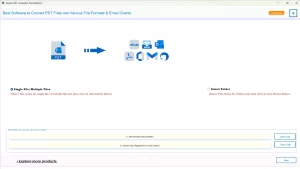
- Then, hit the Select Files/Folders button to add your required PST files to the software.
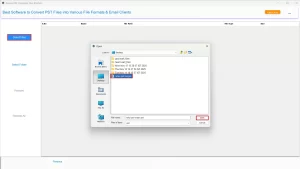
- Next, select the PST files you want to migrate >> preview them >> click Next.
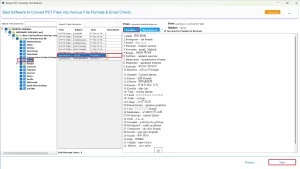
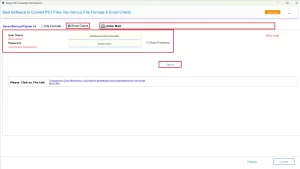
- Now, select Zoho Mail as the destination email client, enter its login details >> hit log in.
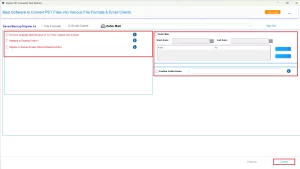
- At last, you can apply any additional filters if you require, then click Convert.
Additional Note: Apart from this software, there is another workaround also. In case you are an advanced user with sufficient time to invest in the manual import process, and don’t mind resolving human errors during the import. You can proceed with the second solution mentioned below.
Solution 2: Use Outlook to Import PST File to Zoho Mail
If you have a few files to import, you can use MS Outlook’s built-in Import/Export Feature. Hence, you require a certain familiarity with Outlook’s interface. Moreover, make sure to follow the steps below carefully to avoid any kind of human errors during the import.
- Firstly, install & open the Outlook application on your existing PC.
- Then, go to the File tab >> click Add Account.
- After that, input your valid Zoho Mail credentials >> click Connect.
- Now, adjust the IMAP settings for your Zoho Mail account to complete the configuration.
- After completing the setup, navigate to File >> Open & Export >>Import/Export.
- Now, choose the Import from another program or file option & click Next.
- Next, select the Outlook Data File (.pst) option & click Next.
- Then, select your desired PST file to import >> click Next.
- At last, select the Zoho Mail folder you added >> select Finish.
Conclusion
To conclude, users prefer to import PST file to Zoho Mail, as Zoho Mail provides better accessibility, management, and organization of PST files. The above blog covered both manual and automated approaches. In case the manual method doesn’t work for you, you can use the automated software. Still, if you have any queries about the entire import process, make sure to contact our tech support team.
Frequently Asked Questions
Q.1 Can I open a PST file directly in Zoho Mail?
Ans. Yes, you can open a PST file directly in Zoho Mail, using the MacGater PST Converter.
Q.2 Is it possible to migrate multiple PST files to Zoho Mail at once?
Ans. Yes, with the help of MacGater PST Converter, it is possible to migrate multiple PST files to Zoho Mail at once.
Q.3 How do I transfer emails from a PST file into Zoho Mail without data loss?
Ans. You can use the automated software above to transfer Emails from PST into Zoho Mail into Zoho Mail without data loss. Steps to transfer are as follows:
1. Open the Macgater PST Converter.
2. Select Files/Folders to add the desired PST files to the software.
3. Choose Zoho Mail as an email client and log in to it.
4. Use the additional features if needed >> hit Convert.
Q.4 Do I need Outlook installed to import PST files into Zoho Mail?
Ans. No, you don’t need Outlook installed to import PST files into Zoho Mail. Instead, you can simply use the MacGater PST Converter for quickly importing your PST files.
Q.5 Can I import contacts and calendar data from PST to Zoho Mail too?
Ans. Yes, using the above-discussed software, you can easily import contacts and calendar data from PST to Zoho Mail too.
About The Author:

Abhilash Dogra is a dedicated IT professional with more than 3 years of experience and has been a key member of Aryson Technology for the past 5 years. His expertise includes email migration and data recovery, with a strong focus on technologies such as MS Outlook and Office 365. In addition to this, Abhilash explores front-end technology and software development. He holds a Bachelor's degree in Computer Technology.