-
Written By Suman Rawat
-
Updated on July 29th, 2025
How to Import MBOX to Zoho Mail: Best Methods Explained
Summary: MBOX is a popular format for saving entire mailbox contents, such as emails, attachments, and other associated data. With the advent of cloud services, many users nowadays prefer importing their MBOX files into Zoho Mail for better access. This blog offers manual as well as professional ways to import MBOX to Zoho Mail without issues. For quick and mass transfers, the sophisticated MBOX Converter Tool is strongly suggested. Use a converter for bulk migration; it employs sophisticated algorithms to provide a seamless import experience with negligible downtime.
Reasons to Import MBOX Files to Zoho Mail
Multiple reasons are associated with importing an MBOX file into Zoho Mail.
- Importing the MBOX file into Zoho Mail allows you to access a unified platform.
- It facilitates you to smoothly transfer your data to other email clients via IMAP.
- You are also able to access your archived emails from any device and anywhere.
- Zoho Mail provides numerous features for your business continuity.
- Importing your MBOX ensures your data is safely stored in the cloud server.
Manual Method to Import MBOX to Zoho Mail
Zoho Mail does not natively support MBOX file import, so you cannot import MBOX files directly into it. However, you can complete the import process by using an MBOX-supported email client as an intermediary. By following the proper steps, you can successfully transfer your MBOX data into your Zoho Mail account with ease.
Step 1: Download and Install Thunderbird
- Visit the official website of Mozilla Thunderbird.
- Download and install the system-compatible Thunderbird application.
Step 2: Open Settings in Thunderbird
- After that, launch the Thunderbird application as an administrator.
- After that, click on the gear icon to access the settings option.
Step 3: Install ImportExportTools NG
- Within the Settings menu, click on the Add-ons and Themes option.
- Here, find the ImportExportTool NG add-on by using the search bar.
- Install it on your system by following the on-screen instructions.
Step 4: Create a New Local Folder
- After that. Go to the local folder label and create a folder to save the MBOX file.
- Then, rename it as per your convenience.
Step 5: Import MBOX File
- After that, right-click on the folder and choose the ImportExportTool NG option.
- Then, select Import MBOX file >> Individual MBOX messages.
- Next, browse and select the MBOX file from your local drive.
- After that, click on the Open button to access these files in Thunderbird.
Step 6: Configure Zoho Mail in Thunderbird
- Again, click on the gear icon to access the Settings toggle.
- After that, click on the Account Settings, then click on the Add Mail Account option.
- Then, enter the Zoho Mail email address and password to configure it.
- Next, complete all the configuration by applying the IMAP protocol.
- Wait for the moment to sync all the data between both email clients.
Step 7: Move MBOX Files to Zoho Mail
- Next, navigate to the local folder containing the MBOX files you want.
- Then, select the specific MBOX file you wish to import into Zoho Mail.
- After that, drag and drop all the MBOX mailboxes into the Zoho Mail interface.
Step 8: Verify Import in Zoho Mail
- Next, launch the Zoho Mail application on your device.
- After that, log in with your credentials to access the imported data.
- Finally, verify that all your imported data is secure and available.
Professional Method to Import MBOX to Zoho Mail
The MBOX Converter Tool is the safest bet for converting MBOX emails to Zoho Mail and other supported destinations. It has bulk importability with full data integrity and strong privacy throughout the entire process. With sophisticated algorithms, it can also import MBOX to AOL Mail, Yahoo Mail, Yandex Mail, and others. Moreover, its user-friendly interface makes it usable for all kinds of users regardless of their knowledge. This utility is perfect for professionals requiring a secure, flexible, and convenient email migration tool across multiple email platforms.
Steps to Upload MBOX Files into Zoho Mail
- Download and install the MBOX Converter Tool.
- Next, select either the Select File or Select Folder option.
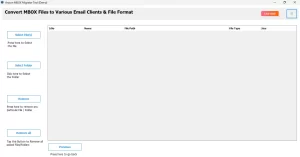
- Then, choose the desired MBOX file from your local drive.
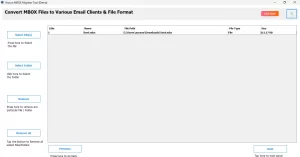
- After that, preview the content by using the tree-like structure.
- In the Email Clients section, choose the IMAP option.
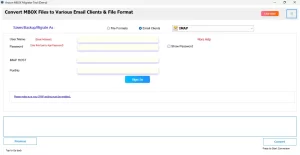
- Next, sign in using your admin account credentials.
Conclusion
This blog outlines two reliable methods to import MBOX to Zoho Mail effectively. The manual approach works well for transferring a small number of emails but becomes time-consuming and impractical for larger datasets. For quick and accurate bulk migration, using a professional MBOX converter is highly recommended. It simplifies the entire process, maintains the integrity of your data, and ensures a smooth conversion experience without requiring technical expertise or risking data loss. Download the MBOX Converter Tool now and simplify your email migration to Zoho Mail.
Frequently Asked Questions
Q.1 Can I import MBOX files directly into Zoho Mail?
Ans. No, Zoho Mail does not natively support MBOX files. You can easily import your MBOX file into Zoho Mail using an MBOX Converter Tool.
Q.2 What is the best method to import MBOX to Zoho Mail?
Ans. The best method to import your desired MBOX file into Zoho Mail is to utilize the professional MBOX Converter Tool. The software directly imports all your desired mailboxes into your Zoho Mail account.
Q.3 How can I transfer MBOX emails to Zoho Mail without losing attachments?
Ans. The best method to transfer your MBOX emails to Zoho Mail without losing attachments is to utilize the professional MBOX Converter Tool. The software directly imports all your desired mailboxes into your Zoho Mail account.
About The Author:

Suman Rawat is a technical content writer and expert in the fields of email migration, data recovery, and email backup. Her passion for helping people has led her to resolve many user queries related to data conversion and cloud backup.