-
Written By Suman Rawat
-
Updated on July 17th, 2025
Import MBOX to Outlook: A Simple Step-by-Step Guide
Summary: Most users use MBOX-supported email clients, but some cloud-based clients, such as Outlook, provide safer and more advanced means of communication. Hence, due to these robust features and advanced security capabilities in Outlook, users want to import MBOX to Outlook. In this blog, we covered both the process, the manual method, and an automated MBOX Converter Tool to make the whole process easy and effective. With these approaches, users can effectively manage, back up, and secure their precious MBOX files in the Outlook environment.
Reasons For MBOX to Outlook Conversion
Here are the top reasons for converting MBOX to Outlook (PST format) in a clear and professional style:
- Outlook is a widely trusted and commonly used email client among corporate and enterprise-level users.
- Outlook seamlessly integrates with business productivity software throughout the Microsoft suite.
- It has built-in support for data security and encryption.
- The PST file system is more scalable and flexible for storing email data.
- Outlook provides a single, centralized platform to manage multiple email accounts and data.
Manual Method to Import MBOX to Outlook
You can import MBOX files to Outlook using manual methods; the process may vary in complexity based on your technical skills and the size of the data. This method typically involves using Mozilla Thunderbird and relevant add-ons. While suitable for small-scale migrations, they often demand careful execution and additional time. Below, we explore these manual approaches in detail.
- Start by downloading the Mozilla Thunderbird application from the official website and installing it on your computer.
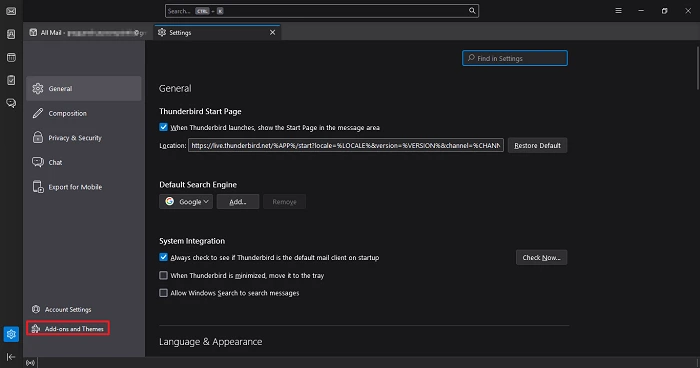
- After that, go to the gear section and click on it to open the settings tab.

- Under the settings tab, choose the Add-ons and Theme option.
- In the search panel, search for ImportExportTool NG add-ons.
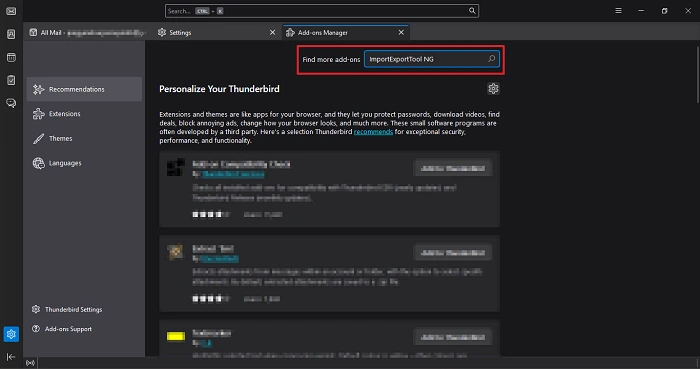
- Follow the on-screen instructions to install the add-ons to install on the application.
- After installation, right-click on the Local Folders section in the left sidebar.

- Select ImportExportTools NG > Import MBOX file > Individual MBOX files.

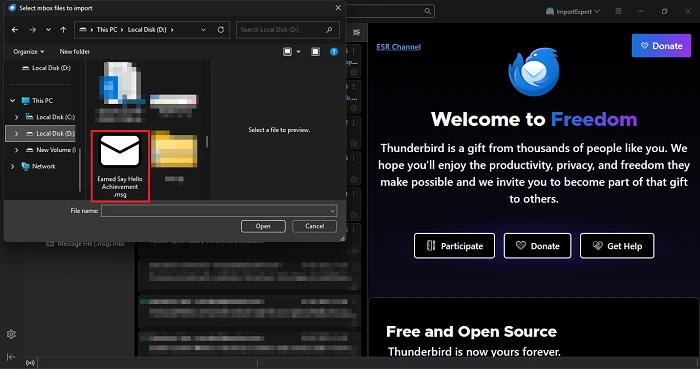
- Navigate to and choose the MBOX file you want to import from your computer.
- Then, click the gear icon once more to access the settings menu.
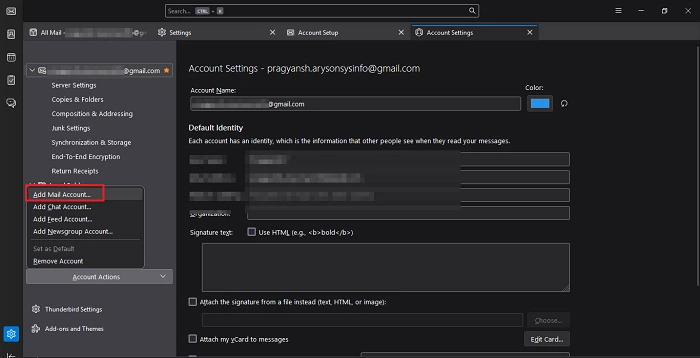
- Select Add Mail Account to set up an additional Thunderbird email account.
- Now, enter the email address and password of the MS Outlook account.
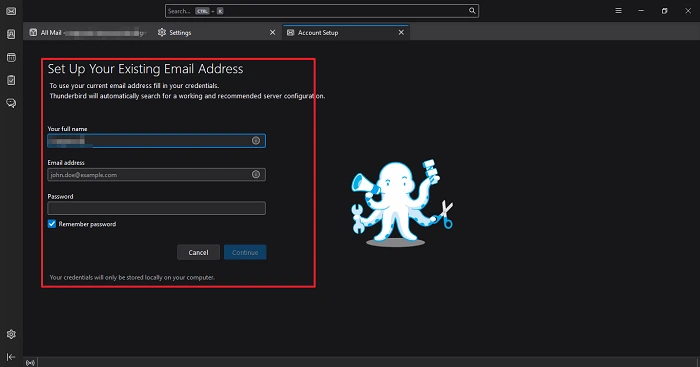
- Now, enter the port number and other protocol information to sync the account.
- Allow some time for Thunderbird to fully synchronize with your configured Outlook account.
- Once syncing is complete, locate and select the specific emails from the imported MBOX file that you want to transfer.
- After that, drag and drop all the chosen files into the Outlook mailbox folder to add MBOX to Outlook.
- In the end, make sure all your data is successfully imported without altering the metadata.
Professional Method to Import MBOX to Outlook
The manual method is effective but includes complex and time-consuming steps that may challenge non-technical users. To streamline the process and protect sensitive data, using a professional MBOX Converter Tool is highly recommended. This tool offers a user-friendly interface and delivers a quick solution for importing MBOX files into Outlook efficiently. It can also convert MBOX to EMLX, PDF, and several other widely supported file formats for broader accessibility. The software is built with advanced algorithms to ensure accurate and reliable results within a short time frame. If you encounter any issues during use, our dedicated support team is always available to help resolve them quickly.
Steps to Open MBOX in Outlook
- Begin by downloading and installing the MBOX Converter Tool on your computer.
- Launch the software and choose either the Select File or Select Folder option, based on your data source.
- Navigate to your local storage and upload the required MBOX file for conversion.
- Use the built-in preview feature to select the specific mailbox data you want to import.
- From the available export options, select PST as the desired output format for Outlook compatibility.
- After that, apply the filter and functionalities as needed.
- In the end, browse to select the saving location and click on the Convert button.
Conclusion
Importing an existing MBOX to Outlook does not need to be complicated if you have the right tools and follow the appropriate steps. The manual process to import MBOX to Outlook is good, but it can consume effort and time, particularly for those who do not have technical knowledge. A reliable MBOX Converter Tool simplifies the entire conversion process while ensuring your data remains safe and completely preserved throughout. It saves effort, minimizes errors, and allows conversion to multiple formats for increased flexibility and control over your email data.
Frequently Asked Questions
Q.1 How can I import MBOX to Outlook without losing data?
Ans. To import MBOX file into Outlook without losing data, the most reliable approach is to use a professional MBOX to PST Converter tool. These tools are specifically designed to preserve email formatting, attachments, metadata, and folder hierarchy during the conversion process.
Q.2 Can I import multiple MBOX files at once?
Ans. Yes, you can import multiple MBOX files at once by using a professional MBOX Converter tool. These tools support bulk conversion, allowing you to add an entire folder containing multiple MBOX files. This approach is far more efficient than manual methods, especially when dealing with large volumes of data.
About The Author:

Suman Rawat is a technical content writer and expert in the fields of email migration, data recovery, and email backup. Her passion for helping people has led her to resolve many user queries related to data conversion and cloud backup.