-
Written By Abhilash Dogra
-
Updated on November 25th, 2025
How to Import EML Files to Outlook and Microsoft 365
Summary: Email migration can be an extremely difficult operation when formats are different. Using and managing outdated EML files presents a hurdle for users who wish to move to Microsoft 365 or Outlook. Outlook does not directly support these files, which originate from email applications like Thunderbird, Windows Live Mail, or Apple Mail. If your goal is to import EML files to Outlook or access them in Microsoft 365, the process becomes much easier with the help of MacGater EML Converter. This guide explains every possible method in simple terms.
Why Convert EML Files to Outlook or Microsoft 365?
- Firstly, Outlook provides much better compatibility than older email clients that still depend on EML files.
- Secondly, many Companies can rely on Outlook and Microsoft 365, so transferring EML data becomes a business requirement.
- Email access can be more flexible with Microsoft 365, which can allow users to work seamlessly on desktop, web, and mobile.
- Users can store emails in Outlook or Microsoft 36, which enhances data security and reduces the risk of loss.
- Hundreds of EML files can be scattered on a system, Outlook stores them neatly in PST format.
Manual Methods to Import EML Files to Outlook
EML files can be moved into Outlook in a variety of methods using manual techniques, which can be simple. Each approach has drawbacks, though, so they are only appropriate for minor jobs rather than large-scale email transfers.
Method 1. Drag and Drop for Quick EML to Outlook Transfer
- Firstly, open Outlook on your computer.
- Next, open File Explorer on your system.
- Browse and select the folder where your EML files are.
- Then, select one or more emails you want to move.
- Finally, drag them into the Outlook folder.
Method 2. Windows Live Mail Export to Import EML Files into Outlook
- To begin, open Windows Live Mail on your system.
- After that, add your Outlook account to Windows Live Mail.
- From the top menu, go to File > Export > Email Messages.
- Next, select Microsoft Exchange as the export destination.
- Then, choose the folders you wish to transfer and confirm your selection.
- Finally, the selected emails will appear in Outlook once the export is complete.
Method 3. Outlook Express Export to Convert EML to Outlook
- First, launch your Outlook Express on an older Windows system.
- Next, bring your EML files into Outlook Express.
- After that, click File > Export > Messages.
- Then, select Microsoft Outlook as the export option.
- Finally, follow the wizard until the transfer completes.
Method 4: Utilizing the Import Wizard for Outlook Method
- Launch Outlook on your computer to get started.
- Go to Import/Export under File > Open & Export.
- Choose “Import from another file” after that.
- Then, select Outlook Data File (PST) and click on Next.
- At this stage, you’ll need to convert your EML files into a PST format.
- After conversion, browse for the PST file and select it.
- Finally, finish the wizard, and your emails will be imported into Outlook.
Method 5: All-in-One Solution to Import EML Files to Outlook
MacGater EML Converter works with all Outlook versions and Microsoft 365, making it highly compatible. Additionally, it handles bulk migrations while keeping folders and attachments intact. On top of that, it prevents all data loss and can support direct cloud import. This professional tool can also import EML to IMAP and other email clients.
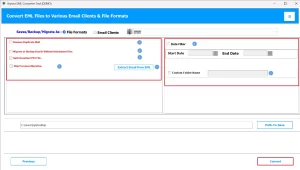
Steps to Import EML to Microsoft 365:
- First, install MacGater EML Converter on your system.
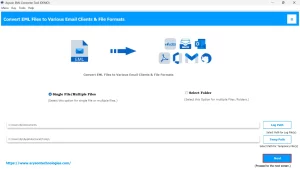
- After that, click on Add files/folder to add your EML files.
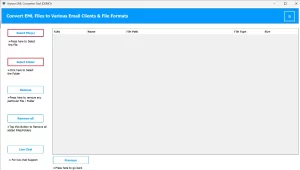
- Before conversion, preview emails and attachments to confirm selection.
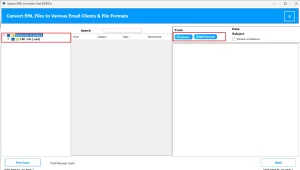
- After that, choose the output format as Hotmail for Outlook or Microsoft 365 for direct import.
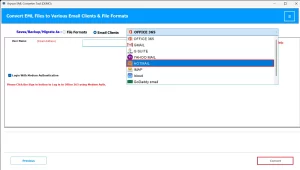
- Enter your Hotmail credentials, like ID and Password, correctly.
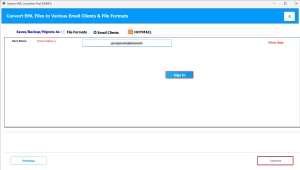
- Finally, start the process by clicking on Convert.
Conclusion
In this blog, it can be difficult for users to import EML files into Outlook, particularly when using error-prone manual techniques. It is a fast, secure, and reliable transfer. MacGater EML Converter offers the perfect solution. It can preserve attachments, folder structure, and email properties while supporting bulk migration. These solutions can be used for personal use or enterprise-level migration.
Frequently Asked Questions
Q.1 Can I import EML files directly into Outlook?
Ans. You can import using the MacGater EML Converter:
1. Install MacGater EML Converter on your system.
2. Simply click on add files/folder to add your EML files.
3. Before conversion, preview emails and attachments to confirm selection.
4. After that, choose the output format as Hotmail.
5. Finally, start the process by clicking on Convert.
Q.2 What is the easiest way to transfer EML files to Outlook?
Ans. The simplest method is using MacGater EML Converter. This converts and transfers EML files into Outlook or Microsoft 365 in one go, preserving all emails, attachments, and folders.
Q.3 Can I import EML files into Microsoft 365 (Outlook Web)?
Ans. Yes, by using the MacGater EML Converter, you can import EML files into Microsoft 365 (Outlook Web), which will sync with Microsoft 365 automatically.
Q.4 Is it necessary to convert EML files before importing them into Outlook?
Ans. Yes, converting EML files to PST ensures compatibility with Outlook and Microsoft 365 and avoids data loss.
Q.5 How can I preserve the folder structure when importing EML files to Outlook?
Ans. Manual methods often fail to maintain the original folder hierarchy. Using MacGater EML Converter guarantees that all folders, subfolders, and attachments remain intact during the import process.
About The Author:

Abhilash Dogra is a dedicated IT professional with more than 3 years of experience and has been a key member of Aryson Technology for the past 5 years. His expertise includes email migration and data recovery, with a strong focus on technologies such as MS Outlook and Office 365. In addition to this, Abhilash explores front-end technology and software development. He holds a Bachelor's degree in Computer Technology.