-
Written By Abhilash Dogra
-
Updated on March 20th, 2026
How to open MSG file in EMLX on Mac: Simple steps to use
Summary: How can Mac users open their MSG files in EMLX format without affecting the email structure and compatibility? MSG files are created by Microsoft Outlook and are commonly used in Windows environments. On the other hand, EMLX serves as the default email file format used by Apple Mail on macOS. Due to this difference, most of the organisations and IT professionals often need a reliable way to access their MSG data within Mac-based email management. In this blog, we will cover the effective methods to open MSG file in EMLX on macOS systems. Along with that, we will outline how the Mac MSG Converter Tool simplifies the entire conversion.
TL; DR: Enterprises and Mac users convert their MSG files to EMLX to access their Outlook emails in Apple Mail, improve compatibility, and manage email data efficiently on macOS. This can be done via a native IMAP-based method or with a Mac MSG Converter Tool for a more accurate and scalable conversion.
Why Do Enterprises Convert MSG to EMLX?
The conversion process improves compatibility with Apple Mail and supports smooth email handling within the macOS environment. In addition, enterprises choose this conversion due to the following reasons:
- EMLX helps to access Outlook MSG files in Apple Mail on macOS.
- It supports better compatibility across Mac-based environments.
- Likewise, you can easily organise your email data within Apple Mail.
- EMLX improves accessibility for teams who work on macOS systems.
- Also, it simplifies the email sharing within Mac-based workflows.
Top Methods to Open MSG file in EMLX
There are multiple ways for conversion, and the right choice depends on your technical requirements and data volume. Below are the widely used approaches that help to complete the process efficiently.
- Native Approach
- Automated Solution
Method 01: Native Approach to Export MSG to EMLX
This method uses the built-in applications on macOS to convert your MSG files into a format that is compatible with Apple Mail. Additionally, this method requires you to open MSG files in a compatible email client and then save or export them into EMLX format. We discussed the whole procedure to save MSG file to EMLX:
Step 01: Load MSG Files in Outlook
- First, open Microsoft Outlook on your system.
- After that, you need to drag and add MSG files into an Outlook folder.
Step 02: Sync Emails via IMAP
- Now, you have to configure an IMAP account in Outlook.
- Thereafter, you can move your MSG emails to IMAP folders.
- In the meantime, you have to wait for the emails to sync with the server.
Step 03: Access Emails in Apple Mail (EMLX)
- To access your emails, you need to open Apple Mail on your Mac.
- Afterwards, you have to add the same IMAP account.
- Now, you need to allow the process of syncing to download emails.
- Finally, your Apple Mail will store emails in EMLX format automatically.
Limitations of the Native Method
- Users require configuration of an IMAP account for data transfer.
- This approach involves multiple steps, which can be time-consuming.
- It depends on stable internet connectivity for proper synchronisation.
- Moreover, there is chances of incomplete email sync during the process.
- The given approach does not support bulk conversion efficiently.
- In addition, there is limited control over selective email migration.
Method 02: Automated Solution to Open MSG file in EMLX
The Mac MSG Converter Tool is a simple and reliable way to convert your MSG files into EMLX format on macOS without manual complications. Moreover, it supports bulk file conversion and retains email elements such as attachments and metadata. You can perform a direct conversion into a format that is supported by Apple Mail. This utility includes options such as a preview option, which makes it suitable for both individual users and enterprise environments. You can easily import MSG files to IMAP server or other formats as well.
Steps to Change MSG File to EMLX:
- To begin, you have to install the Mac MSG Converter Tool on your system.
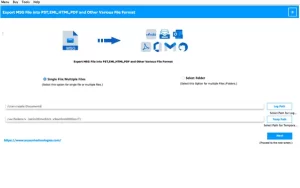
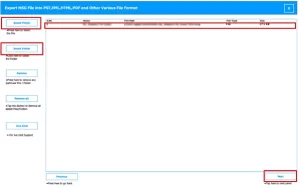
- After that, you need to add MSG files or folders that you want to convert.
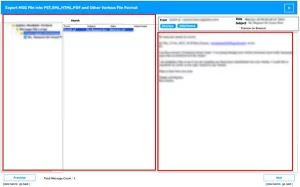
- Now, select and preview the emails to verify the required data.
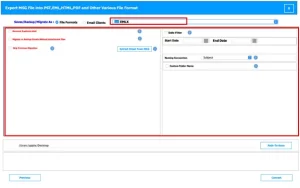
- Next, EMLX as the desired output format >> apply filters as required.
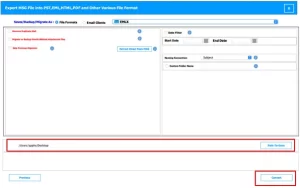
- Select the destination folder to save the output >> Convert for migration.
End Note
In this blog, we have discussed the effective methods to open MSG file in EMLX format on macOS. The manual method works for small conversions but involves several steps and requires proper configuration. In contrast, the automated solution provides a quicker and more organised way to convert large volumes of MSG files and keeps the email data intact. Select the suitable method so that you can access your emails in Apple Mail with ease and manage your data effectively within a macOS environment.
Frequently Asked Questions
Q.1. What is the easiest way to export MSG to EMLX?
Ans: The easiest method is to use the Mac MSG Converter Tool, which allows direct and quick conversion with complete data accuracy.
Q.2 Can I convert MSG to EMLX without Outlook?
Ans: Yes, the Mac MSG Converter Tool enables conversion without requiring Outlook or any email client.
Q.3. How to change MSG file to EMLX on Mac without software?
Ans: You can use an IMAP-based method by syncing emails between Outlook and Apple Mail. However, it takes more time and involves multiple steps.
About The Author:

Abhilash Dogra is a dedicated IT professional with more than 3 years of experience and has been a key member of Aryson Technology for the past 5 years. His expertise includes email migration and data recovery, with a strong focus on technologies such as MS Outlook and Office 365. In addition to this, Abhilash explores front-end technology and software development. He holds a Bachelor's degree in Computer Technology.