-
Written By Abhilash Dogra
-
Updated on February 13th, 2026
Import PST File to Yandex Mail in Easy Steps
Overview: Most of the users still store their emails in Outlook PST files for personal or professional use. The problems arise when they decide to move these email files to Yandex Mail for easier access. Hence, many user do not have a technical background worries about losing emails, attachments, or folder structure. Therefore, for a simple and reliable solution to import PST file to Yandex Mail safely, without affecting folder structure or data integrity. For easy conversion, we suggested using the MacGater PST Converter to convert files with ease.
Why import Outlook PST to Yandex Mail?
There are multiple factors to Import from PST to Yandex Mail. Below are the necessary factors discussed:
- To access files anywhere, Yandex Mail is more reliable as it stores data on a cloud server.
- Next, PST is risky as it contains corrupt files, and to save from that, Yandex is helpful.
- Along with that, Yandex is useful for collecting all the data in one place.
- Also, you should use Yandex to reduce the requirement for Outlook access.
- Apart from that, it will ensure data security and provide a backup of the data.
How is Yandex Mail different from PST Files?
PST (Personal Storage Table)
- PST Format is only suitable for Microsoft Outlook.
- Also, it stores the local copies of emails, contacts, and calendars.
- Further, the modern version supports up to 50 GB data files.
Yandex Mail
- It saved the file on the cloud server.
- Moreover, it provides large storage and is easily available from anywhere.
- Along with that, Yandex Mail has advanced security features.
Now, we will discuss the methods that will upload PST file into Yandex Mail to resolve the users’ issue.
Simmon’s Query: I have a large PST file containing years of Outlook emails that I want to import into my Yandex Mail account. However, I don’t have much technical expertise, and I’m worried about data loss, email formatting, and folder structure during the process. Hence, i need a reliable and fast solution that can safely migrate all my PST emails, along with attachments, into Yandex Mail without any hassle.
How many Ways to Import PST File to Yandex Mail
There are mainly two ways through which you can convert the files based on the requirements. Now, you can proceed further and pick the methods according to your requirement.
- Manual Method: This method is suitable for single files.
- Professional Method: On the other hand, this method is reliable for large files to convert the data.
Manual Method to Import PST File to Yandex Mail
To use this method, you don’t need to install any software or tool for the conversion. So that you can directly import Outlook PST to Yandex Mail via Microsoft Outlook. Below are the steps to follow:
Step 1: Add your Yandex Mail to Outlook
- To initiate, start MS Outlook and go to File and select the Add Account.
- Now, enter the Yandex Login Credentials and select the manual configuration through IMAP.
- Further, enter the server In – imap.yandex.com, Port – 993 SSL, and Out – stmp.yandex.com, Port – 465/587 SSL.
- Lastly, click the Next button and authenticate the account.
Step 2: Import PST Files into Outlook
- In the File tab, choose Open and Import and select Import/Export.
- Now, select the import from another program file and click the Next button.
- Then, opt for the PST, and select the destination to save the file after export.
Step 3: Upload PST files to Yandex
- Now, navigate the folder where you previously stored the PST files in Outlook.
- After that, select the mail to upload, drag and drop it to the Yandex Mail to sync with Outlook.
Shortcomings of the Manual Method
- First of all, the user should have technical knowledge.
- Along with that, it is a very lengthy and time-consuming process.
- Moreover, this method is not suitable for multiple files.
- If a user has large files, then it takes a long time to sync.
Professional Method to Import PST File to Yandex Mail
To convert the PST files into a more reliable and quicker manner, use the professional tool, which will help you move PST Emails to Yandex Webmail. The MacGater PST Converter contains various features that will make it easier for users to convert files simultaneously. Also, this software is used to import PST File to Zoho Mail using this software and in other clients like G-Suite, Gmail, Office 365, etc. To remove duplicate emails from the folder, you can use the filter and move them to trash or permanently delete them. The steps are given below to convert the emails as follows:
- To begin with, download and install the MacGater PST Converter on your PC.
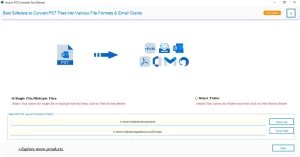
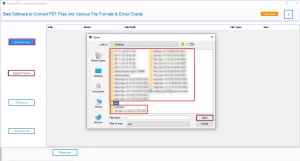
- Now, select the File or Folder from your computer, choose the PST file, and click on the Open button, and click Next.
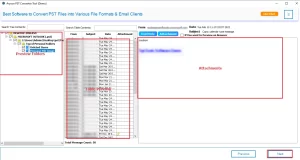
- You can preview the emails, view the attachments from the tree structure, and hit the Next button.
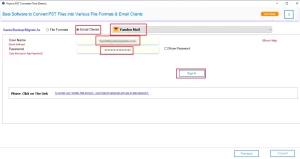
- Further, select the Email client and choose Yandex Mail from the drop-down menu, enter the User name and Password, and click the sign-in button.
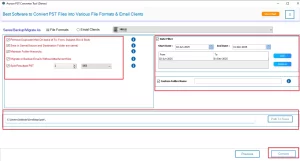
- In the end, apply the filter for specific data and click Convert.
Exclusive Features to Convert PST File to Yandex Mail
The benefits of converting your PST files to Yandex Mail using this tool are discussed as follows:
- It is suitable for all Windows operating systems, Mac, and Linux.
- Wide supportability to migrate single or batch PST files.
- This software has various filters to get specific data.
- The tool can migrate emails along with their attachments.
- Its Simple UI helps users to use this tool to convert their files.
Final Words
Here, we have consulted about the importance of PST file conversion to Yandex Mail. In this blog, you will see two methodologies that will import PST file to Yandex Mail in different ways. The manual method is lengthy yet time-consuming, whereas the professional MacGater PST Converter will ease your workload and convert emails in a faster way.
Frequently Asked Questions
Q.1 Which method is better for large or multiple PST files?
Ans. The MacGater PST Converter Tool is better as it allows you to import multiple PST files.
Q.2 Can I upload a PST file into Yandex Mail without Outlook?
Ans. Yes, the MacGater PST Converter Tool does not require Outlook to upload the PST file to Yandex Mail.
Q.3 Does Yandex Mail support PST files natively?
Ans. The MacGater PST Converter Tool helps users securely convert and import PST emails into Yandex Mail without data loss or formatting changes.
Q.4 How do I ensure no emails are lost during PST import to Yandex Mail?
Ans. To ensure no emails are lost during PST import to Yandex Mail, use the MacGater PST Converter Tool. It preserves email structure, attachments, and formatting.
About The Author:

Abhilash Dogra is a dedicated IT professional with more than 3 years of experience and has been a key member of Aryson Technology for the past 5 years. His expertise includes email migration and data recovery, with a strong focus on technologies such as MS Outlook and Office 365. In addition to this, Abhilash explores front-end technology and software development. He holds a Bachelor's degree in Computer Technology.