-
Written By Abhilash Dogra
-
Updated on February 18th, 2026
How to Import MSG to Thunderbird: Complete Tutorial
Summary: About 400 million Outlook users worldwide handle a countless number of emails on a daily basis. Due to this, most of the users find difficulties such as slow processing while transferring their MSG files to Thunderbird. Fortunately, users need secure solutions that make the process fast and allow them to import MSG files smoothly without any data loss. In this blog, we will cover the best approaches to import MSG to Thunderbird, including the MacGater MSG Converter that simplifies the migration.
Reasons to Convert MSG to Thunderbird
There are some common reasons why most of the users prefer to move their MSG files to Thunderbird, which are discussed below:
- To access emails directly in Thunderbird without relying on Outlook.
- When users need to share MSG files across teams or different platforms.
- Moreover, to organise and search emails efficiently within Thunderbird.
- When users have to reduce the risk of data loss from Outlook.
- Also, when users want a reliable offline copy of their important emails.
Pro Tip: You should always back up your MSG files before the import process in order to avoid any accidental loss.
Effective Ways to Import MSG to Thunderbird
Understand the given primary ways to transfer MSG files to Thunderbird. The approaches provided help the users in an efficient and hassle-free migration.
Manual Approach to Open MSG files in Thunderbird
- Start by launching the MSG email in Outlook by double-clicking it.
- Then, click File > Save As, pick a folder to save >> Text Only as the format.
- Now, change the saved file’s extension from .txt to .eml
- After that, right-click the .eml file >> Open With and select Thunderbird.
- At last, open the email in Thunderbird & verify all content appears correctly.
Drawbacks of the Manual Method
- The manual process can be time-consuming for large numbers of MSG files.
- Subsequently, the attachments and formatting may not transfer correctly.
- Users will not be able to perform bulk email migration.
- Moreover, renaming files does not fully convert MSG to EML.
- Also, errors in saving can prevent Thunderbird from opening emails.
Automated Approach to Import MSG to Thunderbird
MacGater MSG Converter is a secure solution that helps to move MSG files into Thunderbird-supported formats. It allows users to upload multiple files at once using the drag-and-drop option. It offers a preview option so that users can verify their emails before conversion. With built-in filters, users can get 100% accurate and smooth migration without affecting the original data. Also, this utility helps users convert MSG to HTML and other formats such as PDF, MBOX, etc.
Quick Guide to Open Outlook MSG File in Thunderbird:
- Firstly, download and launch MacGater MSG Converter on your computer.
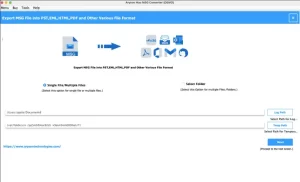
- After that, from Select Files/Folder, you have to upload the required files.
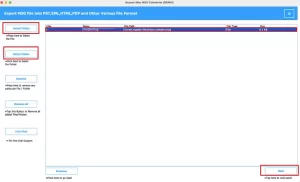
- Then, you can view the selected emails in the preview panel >> Next.
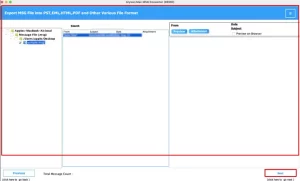
- Now, you have to select Thunderbird as the output file format.
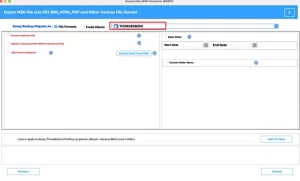
- Next, apply the additional filters for the process of conversion.
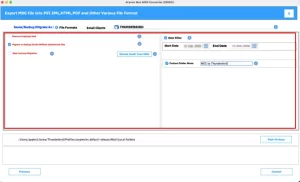
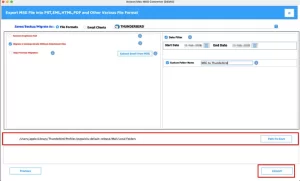
- Finally, select the destination folder and press “Convert” for conversion.
Core Features of the Software to Import MSG Files into Thunderbird
The software consists of useful filter options that help you convert only the emails you actually need. This makes the process faster and more organised.
|
Features |
What It Does |
|
Date Filter |
Let’s you select emails from a specific time period only. |
|
Remove Duplicates |
Skips repeated emails during conversion. |
|
Select Files/Folders |
Allows you to pick only certain MSG files or folders. |
|
Skip Attachments |
Gives you the option to exclude attachments. |
|
Keep Folder Structure |
Maintains the same folder arrangement after conversion. |
|
Choose Save Location |
Help you decide where to store the converted files. |
Final Thoughts
As discussed above, most of the users and IT teams import MSG to Thunderbird for better email management. The manual approach can be helpful when you have a few emails to transfer. However, if you have a large number of MSG files, using a professional tool is recommended. The discussed utility has an easy interface and provides features that make the process simple, even for beginners.
Frequently Asked Questions
Q.1 Is it safe to convert MSG to Thunderbird using third-party tools?
Ans. Yes, it is safe when you use MSG Converter. This software maintains original email data, attachments, and folder structure while ensuring secure and accurate conversion.
Q.2 What is the best format to convert MSG for Thunderbird?
Ans. The best formats are EML or MBOX, as Thunderbird fully supports both. The MSG Converter allows you to export MSG files into these formats for smooth import.
Q.3 Can I import MSG files to Thunderbird without Outlook installed?
Ans. Yes, you can. MacGater MSG Converter does not require Outlook installation, which makes the process easier and more convenient.
Q.4 Do I need any special add-ons to import MSG files into Thunderbird?
Ans. No special add-ons are required if you first convert MSG files into EML or MBOX using the above MSG Converter. After conversion, you can easily import them into Thunderbird.
About The Author:

Abhilash Dogra is a dedicated IT professional with more than 3 years of experience and has been a key member of Aryson Technology for the past 5 years. His expertise includes email migration and data recovery, with a strong focus on technologies such as MS Outlook and Office 365. In addition to this, Abhilash explores front-end technology and software development. He holds a Bachelor's degree in Computer Technology.