-
Written By Abhilash Dogra
-
Updated on March 10th, 2026
Import MSG to iCloud Mail Without Outlook
Summary: MSG files are created by Microsoft Outlook, which helps you to store your individual messages. On the other hand, iCloud Mail is Apple’s cloud-based email service, which can be easily accessed across devices. However, iCloud Mail does not support MSG files directly, particularly when Outlook is not installed. In this blog, we will cover the effective ways to import MSG to iCloud Mail. In addition, we will introduce how the MSG Converter Tool helps in easy transfer.
Reasons to Upload MSG to iCloud Mail
There are various situations when users may need to upload their MSG files to iCloud Mail for better email management. We have discussed some of the common reasons below:
- iCloud helps users to open MSG emails on Apple devices, such as iPhones.
- Moreover, you can keep important emails stored in iCloud cloud storage.
- Users can organise emails in one place instead of keeping multiple files.
- Emails in iCloud Mail can be easily shared or forwarded when needed.
- Also, iCloud simplifies moving emails from Outlook or Windows to Apple.
Proven Ways to Import MSG to iCloud Mail Without Outlook
There are various ways to import your MSG files to iCloud. You can choose a manual approach or use automated software, which depends on your requirements and the size of your data.
- Manual Technique
- Automated Solution
Way 01: Automated Solution to Import MSG File to iCloud Mail
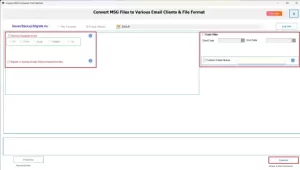
MacGater MSG Converter is a reliable solution that allows you to transfer your Outlook MSG files to iCloud Mail or other formats without using Outlook. Moreover, it keeps all your email details intact, which includes attachments, and supports batch migration. The utility offers filters such as data range and specific sender selection that help you to migrate only the needed emails. You can easily import MSG files to Google Workspace with the same tool.
Steps to Import Outlook MSG to iCloud Mail:
- First, install the MSG Converter on your Windows or Mac system.
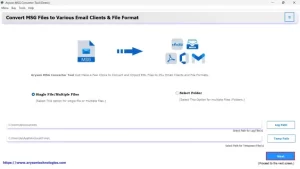
- After that, upload the MSG files or a folder containing multiple MSG emails.
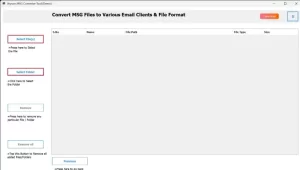
- Then, preview the emails and attachments to check everything is correct.
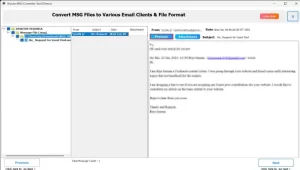
- Afterwards, you need to select iCloud Mail as the output format.
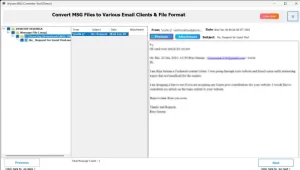
- Next, you have to enter the required iCloud credentials to proceed further.
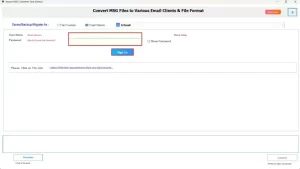
- At last, apply filters like date range, then click Convert for the import.
Way 02: Manual Method to Transfer MSG to iCloud
Users who want to move their MSG files to iCloud Mail manually have to install Outlook on their system. Also, their iCloud Mail account details should be ready so that they can configure the account through IMAP.
Easy Steps to Open MSG File in iCloud Mail:
- Firstly, you have to launch Outlook on your Windows system.
- After that, you have to go to File and select Add Account.
- Now, enter your iCloud email address and click Connect.
- Then, configure the account using the required IMAP settings.
- Next, you have to locate the MSG files stored on your computer.
- Now, drag and drop the MSG files into Outlook or open them directly.
- Click File, then choose Move to Folder and select Copy to Folder.
- At last, you need to select the iCloud mailbox folder for import.
Limitations of the Manual Method
- Outlook must be installed, which may not be possible on every computer.
- Moreover, the process can take a long time if you have many MSG files.
- You should have some technical knowledge to set up IMAP correctly.
- Subsequently, mistakes can happen while dragging files or converting them.
- In addition, you cannot move a large number of emails at once.
End Note
To conclude, we have covered both the manual and professional solutions to import MSG to iCloud Mail. You can use the manual method for a small number of emails, but it requires some technical setup. In contrast, a professional utility provides a more reliable and error-free way to migrate your large volume of MSG files. Users should select the method that best suits their requirements, which depends on the number of emails and their technical comfort level. For quick assistance during the process, feel free to contact our support team, who are always ready to help.
Frequently Asked Questions
Q.1 Can iCloud Mail open MSG files?
Ans. No, iCloud Mail does not support MSG files directly. To access MSG emails, you need to use a professional utility such as the MSG Converter.
Q.2 What is the best way to transfer MSG files to iCloud Mail?
Ans. The most reliable way is to use MacGater MSG Converter, which can directly migrate MSG files to iCloud Mail. It keeps all attachments, email formatting, and folder structure intact.
Q.3 Can I open MSG files in iCloud Mail without Microsoft Outlook?
Ans. Yes, by using the discussed MSG Converter, you can import MSG files to iCloud Mail without needing Outlook installed on your system.
Q.4 How can I import MSG to iCloud Mail?
Ans. You can quickly transfer MSG files to iCloud Mail using the discussed software with just a few simple steps.
1. Install MSG Converter on your system.
2. Upload MSG files or a folder of emails.
3. Preview emails and attachments.
4. Choose iCloud Mail as the output.
5. Enter your iCloud credentials.
6. Apply filters and click Convert.
Q.5 Is it safe to transfer MSG files to Apple Mail?
Ans. Yes, using a MacGater MSG Converter ensures a secure migration. It preserves all email data, attachments, and folder structure without data loss.
About The Author:

Abhilash Dogra is a dedicated IT professional with more than 3 years of experience and has been a key member of Aryson Technology for the past 5 years. His expertise includes email migration and data recovery, with a strong focus on technologies such as MS Outlook and Office 365. In addition to this, Abhilash explores front-end technology and software development. He holds a Bachelor's degree in Computer Technology.