-
Written By Abhilash Dogra
-
Updated on March 18th, 2026
Import MSG Files to IMAP Server – Complete Beginner’s Guide
Summary: MSG files and IMAP servers have different purposes in email management. An MSG file is a single-message format which is created by Microsoft Outlook that stores email content and detailed properties in a local file. In contrast, IMAP works as an email protocol that keeps your messages on a mail server and allows access from multiple devices with automatic synchronization. Therefore, in this blog, we will cover the most effective approaches to import MSG files to IMAP server, which includes the MSG Converter Tool for accurate email migration.
TL;DR:IT professionals import their MSG files to an IMAP server to enable centralized email access and multi-device synchronization. This can be done using a manual Outlook-based method or via the MSG converter tool for a more efficient migration process.
Why Do Enterprises Upload MSG Files to IMAP?
Most of the enterprises import their MSG files to IMAP server to enable centralised email access and for other reasons, which are provided below:
- Users can access emails from multiple devices without any file dependency.
- Moreover, IMAP offers better email organisation within a structured mailbox.
- You can enable real-time synchronisation across desktop, web, and mobile.
- There is less risk of data loss due to system failure or file misplacement.
- Also, IMAP simplifies email sharing and collaboration in team environments
Proven Approaches to Import MSG Files to IMAP Server
There are several methods to complete the process, and the appropriate method depends on your requirements and technical skills. Below, we have discussed the two best approaches that help you to complete the import efficiently.
- Conventional Method
- Advanced Solution
Approach 01: Conventional Method for MSG to IMAP Migration
In this approach, you need to configure an IMAP account within the email client and then manually transfer your MSG files into the mailbox. Moreover, it allows its users to upload their emails directly to the server environment and maintains the basic structure and accessibility across devices.
Steps to import Outlook MSG files to IMAP:
- Firstly, you have to open Microsoft Outlook on your system.
- After that, you need to add and set up your IMAP account in Outlook.
- Now, you have to create a folder within the IMAP mailbox.
- Now, navigate to the folder where the MSG files are stored.
- Afterwards, you can drag and drop the MSG files into the IMAP folder.
- In this step, you have to allow Outlook to sync and upload the emails.
- At the end, check your IMAP account via webmail to confirm the upload.
Limitations of the Manual Method
- Users require Outlook configuration with a valid IMAP account.
- Moreover, it is not suitable for your bulk MSG file migration.
- This approach is time-consuming when you handle large volumes of emails.
- Subsequently, there is a risk of missing or incomplete email transfer.
- Likewise, during the process, there is a high chance of manual errors.
- Also, control over email attributes and accuracy is limited.
Approach 02: Advanced Solution to Import MSG files to IMAP Server
The MSG Converter Tool is a direct and efficient way to upload your MSG files to an IMAP server without having any complex configuration. Likewise, it provides accurate data transfer and maintains the email structure throughout the process. Additionally, it provides advanced filters, such as a data range filter to import selective emails and duplicate email handling to avoid redundancy. Also, you can refer to our complete guide on import MSG to Yahoo Mail for a step-by-step method to move your MSG files directly into a Yahoo account.
Quick Tutorial to Import Outlook Message Files (MSG) to IMAP Server:
- Firstly, download and install the MSG Converter Tool on your system.
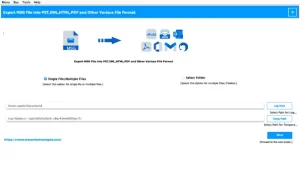
- After that, you need to launch the software and add MSG files or folders.
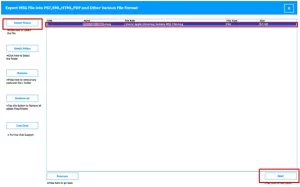
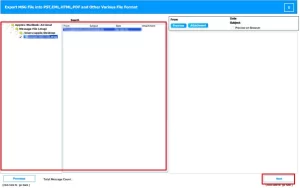
- Now, you have to preview the loaded emails before you proceed further.
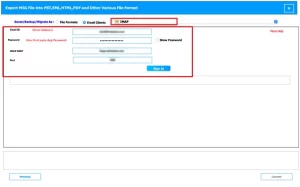
- Select IMAP as the saving option >> enter your IMAP account credentials.
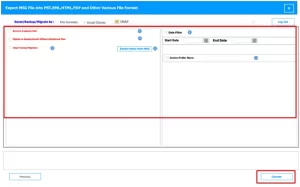
- Now, you can apply any required filters >> Convert for the import process.
End Note
In this blog, we have discussed reliable methods to import MSG files to IMAP server, which include both conventional and advanced approaches. The conventional method works best for minor requirements, while the automated solution delivers a more efficient way to manage large-scale data transfer. Select the right approach that helps in a smooth and accurate migration process. If you need any assistance, you can contact our support team for reliable help.
Frequently Asked Questions
Q.1 Are there free ways to import MSG files to IMAP?
Ans: Yes, a free method is available using an email client like Outlook, where you can manually upload MSG files to an IMAP-configured account. However, this approach suits small data volumes and may require more time and effort.
Q.2 What is the easiest way to upload MSG files to an IMAP account?
Ans: The simplest method is to use a professional MSG converter tool. It allows direct upload of MSG files to an IMAP account with minimal steps, while also supporting bulk migration and maintaining complete email data.
Q.3 Can I migrate MSG files to IMAP without Outlook?
Ans: Yes, you can complete the migration without Outlook by using an automated tool. It does not require any email client configuration and enables direct transfer of MSG files to the IMAP server with accuracy.
About The Author:

Abhilash Dogra is a dedicated IT professional with more than 3 years of experience and has been a key member of Aryson Technology for the past 5 years. His expertise includes email migration and data recovery, with a strong focus on technologies such as MS Outlook and Office 365. In addition to this, Abhilash explores front-end technology and software development. He holds a Bachelor's degree in Computer Technology.