-
Written By Abhilash Dogra
-
Updated on February 27th, 2026
Best Methods to Import MSG Files to Google Workspace
Summary: Do you need to move your important emails saved as MSG files into Google Workspace? Most of the users find it difficult, as MSG files from Outlook are not directly compatible with Google Workspace. In this blog, we will cover the safe ways to import MSG files to Google Workspace, including the MSG Converter for easy transfer without any data loss.
Reasons to Import MSG to G Suite
The following points explain why the process of importing your MSG files to Google Workspace is important:
- To access Outlook emails from anywhere using Google Workspace.
- When you have to centralise all email data in one cloud-based platform.
- Users want to improve collaboration by sharing emails with team members.
- Subsequently, to provide better data backup and recovery options.
- Also, when you have to reduce dependency on local email clients & storage.
Reliable Approaches to Import MSG Files to Google Workspace
To move your MSG files to Google Workspace securely, users can choose from the given proven methods that provide data accuracy and security.
- Native Technique
- Automated Technique
Approach 01: Native Technique to Transfer MSG files to Google Workspace
This method uses Microsoft Outlook and an IMAP connection to move your MSG files to a Google Workspace account. It is helpful for users who want a cost-free solution but require proper account setup and manual effort.
Easy Steps to Convert MSG Files into Google Workspace:
- Firstly, you need to launch Microsoft Outlook on your computer.
- Then, add your Google Workspace account to Outlook using IMAP settings.
- After that, right-click on the added account & create a new folder.
- Next, you have to give the folder a suitable name, such as “MSG Data“.
- Now, you need to locate the MSG files on your system and select them.
- Afterwards, drag the selected MSG files into the newly created folder.
- Now, you have to wait until Outlook completes the sync process.
- After sync, the emails will appear in your Google Workspace mailbox.
Limitations of the Native Technique
- The manual method takes a lot of time if you have many MSG files.
- For this process, you must install and configure Outlook properly.
- Subsequently, the process depends on the internet speed for sync.
- There is a risk of missing some emails during transfer.
- Moreover, it does not support bulk migration in a smooth way.
- In addition, you should have technical knowledge for IMAP setup.
Approach 02: Automated Technique to Import MSG Files to Google Workspace
The MSG to G Suite Migration Tool is a reliable approach to move your MSG files into a Google Workspace account without the need for Outlook. It helps in the batch upload of multiple files at once and keeps the original folder layout unchanged. The software provides helpful options such as a custom data filter, duplicate mail removal, and much more. Also, you can convert MSG to DOC and many other formats, such as PDF and Gmail, etc.
Easy Steps to Upload MSG Files to Google Workspace:
- Firstly, install and start the MSG to G Suite Migration software.
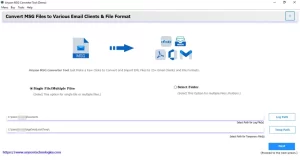
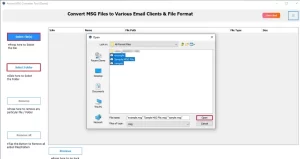
- After that, you have to use the Select File/Folder to load your MSG data.
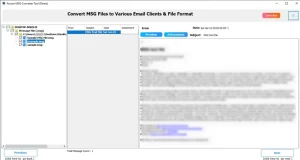
- Next, you have to check the preview of emails and proceed to the next step.
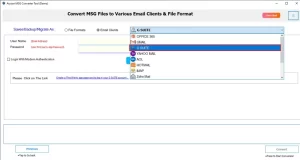
- Now, select Google Workspace (G Suite) as the target platform and log in.
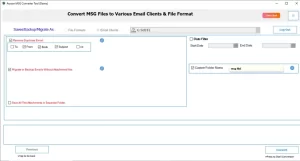
- Set filters like date ranges >> Convert to migrate MSG to Google Workspace.
End Note
In conclusion, the process to import MSG files to Google Workspace can be done through manual techniques or with an automated solution. The manual technique can work for a small number of files, but it takes more time and effort. On the other hand, an automated solution makes the process faster and more accurate, even for bulk data transfer. Choose the appropriate methods that can best match your requirements and provide complete data safety. If you need any help during the process, you can contact our support team for quick assistance.
Frequently Asked Questions
Q.1 Can I migrate MSG emails with large attachments to Google Workspace?
Ans. Yes, the MSG to Google Workspace software moves MSG emails with attachments safely and keeps the original data intact.
Q.2 Can MSG files be imported to shared Google Workspace mailboxes?
Ans. Yes, the discussed utility moves MSG emails with attachments safely and keeps the original data intact.
Q.3 What is the best method to import MSG to Google Workspace?
Ans. Using a dedicated MSG to Google Workspace migration tool is the safest and most efficient option, especially for bulk migration.
About The Author:

Abhilash Dogra is a dedicated IT professional with more than 3 years of experience and has been a key member of Aryson Technology for the past 5 years. His expertise includes email migration and data recovery, with a strong focus on technologies such as MS Outlook and Office 365. In addition to this, Abhilash explores front-end technology and software development. He holds a Bachelor's degree in Computer Technology.