-
Written By Abhilash Dogra
-
Updated on November 25th, 2025
How to Import EML to Yandex Mail (Step-by-Step Guide)
User Query: “Hi, I am Nico Robin, and my startup has around 500 EML files that we want to transfer to my Yandex account. I have tried multiple methods of doing it, but they were too slow, and some emails were missing attachments. What’s the best way to move them safely?”
Summary: Ever wonder why many users want to import their EML files to Yandex Mail? A user import EML to Yandex Mail as a result, they can store all their old emails in a secure and centralized account. Yandex Mail offers cloud storage, easy accessibility, and better data security compared to keeping files locally. This blog explains reliable ways to transfer EML files to Yandex Mail, including a quick solution using the MacGater EML Converter. The tool makes it simple to perform bulk migration while preserving attachments, email formatting, and folder hierarchy without errors.
Reasons to Import EML Files into Yandex Mail
Many individuals and organizations prefer EML to Yandex Mail migration for the following reasons:
- EML files scattered across folders can be merged into one Yandex Mail account.
- Emails can be opened on any device via Yandex Webmail or the mobile app.
- Unlike local drives that may crash or get corrupted, Yandex servers offer better safety.
- Organizations moving from older email platforms often migrate EML files into Yandex for record-keeping.
Available Options to Move EML file into Yandex Webmail
When you want to open EML files in Yandex Mail, there are two practical approaches: the manual method using an email client and the automated method with a professional tool.
Method 01: Built-in Way to Import EML to Yandex Mail
The manual method typically requires an email client like Mozilla Thunderbird that supports both EML import and Yandex IMAP.
- Firstly, open the Thunderbird application on your PC.
- After that, navigate to Tools and select Account Settings.
- Then, click on Account Actions and tap on Add Mail Account.
- Next, enter your Yandex Mail credentials to set up the account in Thunderbird.
- Once the configuration is complete, create a new folder inside your Yandex mailbox.
- After that, navigate to the location of your EML files on your computer.
- Simply drag and drop them into the newly created folder.
- Finally, open your Yandex Mail in a browser to verify.
Disadvantages of the Manual Method:
- Time-consuming for bulk transfers.
- Technical Knowledge needed for IMAP setup.
- Data Loss can occur while handling large files.
- Folder Structure Issues, as emails may not always remain organized.
- Because of these limitations, many users prefer an automated solution.
Method 02: Quick Way to Import EML to Yandex Mail
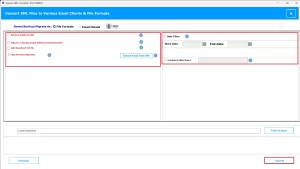
The MacGater EML Converter is a software recommended by the experts that can import EML files to Yandex Mail quickly. This utility can directly import EML files into Yandex Mail without installing Thunderbird or Outlook. It ensures that the safety of your attachments, formatting, and folder hierarchy is preserved. The utility also supports migration into other platforms, such as AOL Mail, Zoho Mail, and more. Along with Yandex Mail, it can also import EML to AOL Mail, Gmail, Office 365, and others.
Easy steps to Open EML file in Yandex Mail:
- Firstly, download and install the EML Converter on your system.
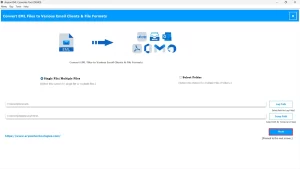
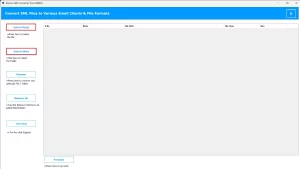
- After that, to load your EML files, click on Select Files/Folders.
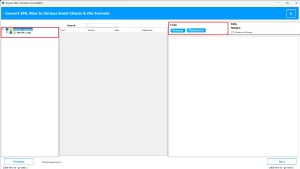
- Now, preview the emails and attachments before migration.
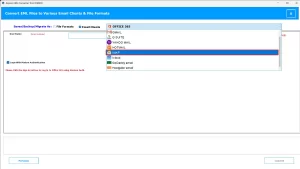
- From the drop-down menu, select IMAP as the saving option.
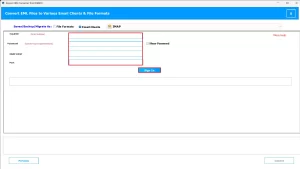
- Enter your Yandex Mail login details and click on Sign In.
- Finally, click on convert to start the migration.
Conclusion
Import EML to Yandex Mail to keep emails safe, accessible, and well-arranged in one account. The manual option with an email client suits a small number of files, but it takes more effort. For a large set of emails, a direct method proves faster and more secure, with no risk of missing attachments or losing folder order. You can always choose the right approach that will help you move EML files to Yandex Mail with ease.
Frequently Asked Questions
Q.1 What should I do if my EML files are not importing correctly to Yandex Mail?
Ans. If EML files fail to load properly, use the MacGater EML Converter tool. Such software can directly connect with your Yandex account:
1. Download and install the EML Converter on your system.
2. To load your EML files, click on Select Files/Folders.
3. Preview the emails and attachments before migration.
4. From the drop-down menu, select IMAP as the saving option.
5. Enter your Yandex Mail login details and click on Sign In.
6. Click on convert to start the migration.
Q.2 Is there a way to move EML files directly into Yandex Webmail?
Ans. Direct import is not available in Yandex Webmail. However, with the MacGater EML Converter tool, you can connect to Yandex via IMAP and move emails in just a few steps, without using Thunderbird or other manual setups.
Q.3 Will importing EML files to Yandex Mail affect my existing emails?
Ans. No, when you use the MacGater EML Converter tool, it can import EML files safely without touching your current data. Your old messages remain in place, and new ones get added to your Yandex Mail account.
Q.4 Can I organize imported EML emails into folders within Yandex Mail?
Ans. Yes, by using the MacGater EML Converter software. You can choose the destination of the imported file, and you can arrange your emails into folders directly in Yandex Mail.
About The Author:

Abhilash Dogra is a dedicated IT professional with more than 3 years of experience and has been a key member of Aryson Technology for the past 5 years. His expertise includes email migration and data recovery, with a strong focus on technologies such as MS Outlook and Office 365. In addition to this, Abhilash explores front-end technology and software development. He holds a Bachelor's degree in Computer Technology.