-
Written By Abhilash Dogra
-
Updated on November 25th, 2025
How to Import EML to HostGator Mail: Complete Guide
User Question: For years, I’ve been collecting hundreds of EML files from work, and it is becoming more difficult to access anything stored on the local computer. I just want to move them to my HostGator Mail account without losing the folder structure and attachments. What is the best solution for the procedure?
Summary: Emails play an important role in our daily lives for communication, and many users keep old messages stored as EML files. However, accessing the files can be difficult when they are scattered, and local storage always has the risk of corruption. HostGator Mail offers a secure cloud platform that ensures safety and accessibility. To migrate EML files smoothly, the MacGater EML Converter provides a reliable solution that preserves attachments, formatting, and folder hierarchy during the transfer. This guide outlines the reasons why users want to import EML to HostGator Mail and explains the steps to do so without compromising your data.
Benefits of Uploading EML Files to HostGator Mail
When you upload EML Files to HostGator mail, you receive many benefits, whether you are an individual or a larger organization:
- When EML files are uploaded, relevant communications remain readily accessible across devices while allowing you to definitely access client and project files.
- HostGator Mail can also have multiple team members log in to the same mailbox address, making it easier to cooperate by sharing email and retrieving important emails.
- Local storage devices can fail or become corrupted with no chance of retrieving the information – your risk of losing emails due to a bad drive or accident is diminished since they are hosted on HostGator servers.
- Many businesses have a requirement to maintain records of their emails for compliance.
- Mail gives you storage for your emails in a single place, easily searchable and referenceable.
- If users are coming from desktop clients or older email platforms, moving their EML files to the more updated cloud-based solution keeps their previous email intact.
Techniques for EML to HostGator Mail Migration
Users can have several ways to initiate the solution to open EML files in HostGator Mail. The first approach is the built-in technique using Roundcube webmail, and the second is a professional automated method with a specialized tool.
Techniques 01: Import EML file to HostGator Mail with Roundcube
HostGator Mail users can move EML files manually using Roundcube. This method allows direct access to EML messages in your mailbox without additional software, although it works best for smaller batches.
Before starting, make sure of the following:
- Log in to your HostGator Roundcube webmail account.
- Collect all EML files and place them in a folder.
- Decide the folder in Roundcube where the emails should appear.
Steps to Upload EML file into HostGator Mail
- Navigate to your HostGator email dashboard and log in.
- Choose your Inbox or create a new folder for the imported emails.
- Click the gear icon at the bottom-left and select Import Messages.
- After that, click on Choose File to select the EML files from your system, and click Import.
- Finally, emails will be added to Roundcube in HostGator with all attachments.
Disadvantages of the above-mentioned built-in technique
- Time-consuming when handling a large number of files.
- Folder hierarchy might not be preserved for complex email collections.
- Bulk import may require multiple attempts if files are very large.
Method 02: Quick Solution to Import EML to HostGator mail
The MacGater EML Converter is an efficient method for migrating EML files into the HostGator Mail server using an IMAP connection and keeping the attachments, attached files, formatting, and the folder hierarchy. Some of the advantages are the ability for a bulk migration with direct access, no emails missed, attachments are kept, metadata is preserved, and still keeps the original folder structure, all making it easier to find and access the files. The converter also enables the user to Import EML to Yandex Mail.
Quick & Easy Steps to Open EML File in HostGator Account:
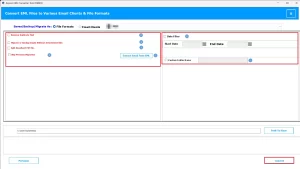
- Firstly, download the MacGater EML Converter on your computer.
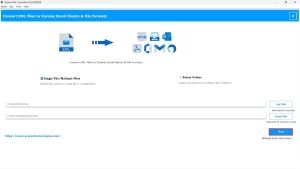
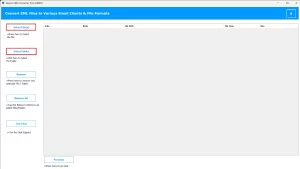
- Click Select Files/Folders to load the EML files you want to migrate.
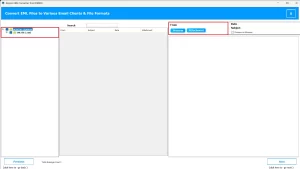
- Preview emails and attachments before starting the transfer.
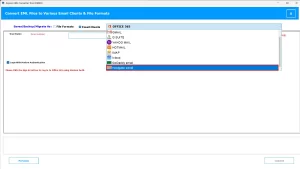
- Choose IMAP as the output option from the available options.
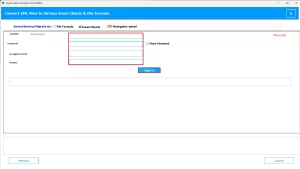
- Simply, enter your HostGator Mail credentials to sign in.
- Finally, click on convert to start the process.
Conclusion
When you import EML to HostGator mail, it might help users to secure emails, centralize records, and maintain organized access across devices. In this blog, we have discovered the right techniques for the conversion. The MacGater EML Converter provides the most efficient and reliable solution, ensuring attachments and folder order remain intact. Users have choices for selecting the right method, users can achieve safe, accurate, and well-structured migration of EML files into their HostGator Mail accounts.
Frequently Asked Questions
Q.1 How do I open or view an EML file in HostGator Mail?
Ans. You can open EML files using MacGater EML Converter, which allows you to preview emails, attachments, and metadata before importing them to HostGator Mail. The tool ensures that all email content remains intact.
Q.2 Do I need to use an email client like Outlook to import EML files to HostGator?
Ans. No, MacGater EML Converter lets you import EML files directly into HostGator Mail without relying on other email clients, making the process faster and easier.
Q.3 Is there a limit to the number of EML files I can import into HostGator Mail?
Ans. No, the tool supports bulk migration, so you can import thousands of EML files at once. MacGater EML Converter ensures all emails are transferred without any data loss.
Q.4 Why would I need to import EML files to HostGator Mail?
Ans. You may need to centralize emails, preserve older messages, or move emails from other clients. MacGater EML Converter ensures safe and accurate migration, keeping all your emails organized in HostGator Mail.
About The Author:

Abhilash Dogra is a dedicated IT professional with more than 3 years of experience and has been a key member of Aryson Technology for the past 5 years. His expertise includes email migration and data recovery, with a strong focus on technologies such as MS Outlook and Office 365. In addition to this, Abhilash explores front-end technology and software development. He holds a Bachelor's degree in Computer Technology.