-
Written By Abhilash Dogra
-
Updated on November 25th, 2025
Import EML to AOL Mail – Easy Guide to Upload & Transfer
Summary: When a user imports EML files into AOL Mail, it can help users to centralize their data. AOL Mail provides cloud storage, better security, and accessibility across multiple devices. This way, users avoid the risk of data that comes with keeping EML files locally. This blog provides a quick and reliable solution to import EML to AOL Mail with the MacGater EML Converter, which is highly recommended. This can easily support bulk EML migration while preserving the attachments of the emails without any errors.
Reasons to Import EML Files into AOL Mail?
Before discussing the methods, let’s understand why many users want to upload EML files to AOL Mail:
- It can provide the Centralized Management, which means EML files are stored across multiple folders, whereas AOL Mail can organize everything in one place.
- After the transfer, you can simply open your emails on any device without being tied to one system.
- Local drives can crash or fail, but AOL Mail stores data on its own secure servers.
- When you manage old and new emails within one AOL Mail account, it removes the hassle of switching between applications.
- Organizations that migrate from older platforms often need to bring EML files into AOL Mail for record-keeping.
Top Methods to Transfer EML File to AOL Mail
When users want to access their old emails, which are stored in the EML file format. One of the best ways to make them more secure is by importing them into AOL Mail. There are two ways of fixing this issue: the manual way and the automated way. Below are the top 2 methods to transfer EML files to AOL Mail without losing important data.
Method 01: Built-in Solution to Import EML to AOL Mail
The manual process usually involves using an email client like Thunderbird that supports both EML files and AOL Mail IMAP. You can simply move your EML files into AOL by adding your AOL Mail in the client.
- First, enable IMAP in your AOL Mail account.
- Open Thunderbird (or another client that supports EML files).
- Add your AOL Mail account to Thunderbird using IMAP settings.
- Restart the client, and you will see AOL Mail in the left-hand panel.
- Create a new folder inside the AOL account.
- Drag and drop your EML files into this folder.
- Open your AOL Mail account in a browser to verify if the emails appear.
Disadvantages of the built-in Method
While this process works, it comes with several disadvantages:
- Time-consuming when transferring large volumes of emails.
- Technical Knowledge required for IMAP configuration.
- Folder Structure Issues, such as emails, may appear disorganized.
- Risk of Data Loss during manual handling, especially with attachments or metadata.
- Due to these problems, many users prefer an automated method that avoids errors and saves time.
Method 02: Quick Way to Import EML to AOL Mail
The MacGater EML Converter is a professional conversion tool designed to make EML migration fast and simple. It lets users import EML files directly into AOL Mail without manual configuration hassles. Simply, you just have to add the file and preview the file before conversion within a few clicks. All your EML data will remain the same, along with the email and its folder structure and attachments. This utility can also import EML to Zoho Mail along with other email clients.
Steps to Import EML Files to AOL Mail Using MacGater
- To start with, download and install MacGater EML Converter on your computer.
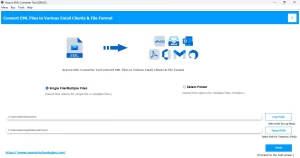
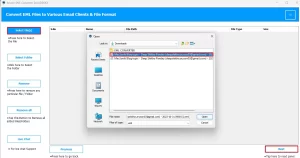
- Then, choose files by clicking on Select Files/Folders to load your EML files.
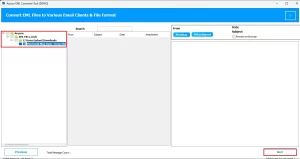
- After that, preview the emails and attachments before migration.
- Next, choose IMAP as the destination platform.
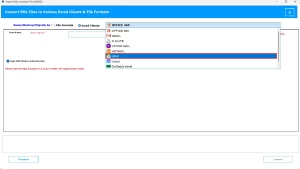
- Afterwards, enter your AOL Mail login credentials.
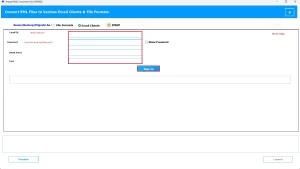
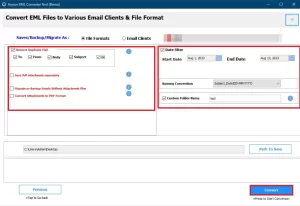
- At the end, click on convert to start the migration.
User Query: “Hello, I’m Samantha. I really need to move around 200 EML files into my AOL Mail account. I tried the manual method, but it’s taking forever, and some emails are not showing up correctly. What’s the best way to move EML Files to AOL Mail smoothly?”
Conclusion
In this blog, we have discussed two ways to import EML to AOL Mail. First is the built-in method of Thunderbird, which works for small amounts of data, but it comes with some disadvantages. On the other hand, the above-mentioned utility can offer a reliable solution for the bulk transfer. So that you can import thousands of emails in one go while preserving attachments, formatting, and folder structure.
Frequently Asked Questions
Q.1 How do I import EML files into AOL Mail?
Ans. You can import EML files into AOL Mail by using MacGater EML Converter, which is the fastest and safest option:
1. Firstly, download and install MacGater EML Converter on your computer.
2. Then, launch the tool and click on Add Files/Folders to load your EML files.
3. After that, preview the emails and attachments before migration.
4. Next, choose IMAP as the destination platform.
5. Afterwards, enter your AOL Mail login credentials.
6. At the end, click on Convert to start the migration.
Q.2 Is it possible to move EML files directly to AOL Mail without using a third-party email client?
Ans. Yes. While AOL Mail itself does not provide a direct import feature, MacGater EML Converter allows you to move EML files directly to AOL Mail without relying on Thunderbird or Outlook.
Q.3 Can I transfer EML files to AOL Mail without losing any data?
Ans. Yes. If you use the MacGater EML Converter tool, it can make your transfer while preserving the format and hierarchy throughout the process.
Q.4 Can I convert EML files to another format to import them into AOL Mail? If yes, which format is compatible?
Ans. Yes. MacGater EML Converter can convert EML files into many formats like PST, MBOX, MSG, DOC, PDF, CSV, EMLX, XLSX, OFT, and more.
About The Author:

Abhilash Dogra is a dedicated IT professional with more than 3 years of experience and has been a key member of Aryson Technology for the past 5 years. His expertise includes email migration and data recovery, with a strong focus on technologies such as MS Outlook and Office 365. In addition to this, Abhilash explores front-end technology and software development. He holds a Bachelor's degree in Computer Technology.