-
Written By Abhilash Dogra
-
Updated on November 25th, 2025
How to Convert PST File to EMLX: Step-by-Step Tutorial
Summary: You may have trouble accessing old emails while moving from Windows Outlook to Apple Mail. This is due to the fact that Outlook saves your mailbox data in PST format, and Apple Mail saves data in EMLX. The best way to solve this is to convert PST file to EMLX, and then you can open and manage all your Outlook emails in Apple Mail. In this tutorial, we will explore methods of safely exporting your PST emails to EMLX with zero data or formatting loss. We will also introduce you to MacGater PST Converter for Mac. It is a helpful solution to perform fast and secure conversion.
Why Should You Convert PST to EMLX?
There are many reasons why users would need to convert an Outlook PST to EMLX files, particularly when transitioning from a Windows PC to macOS. Here are the reasons why it is useful:
- Access Outlook Emails in Apple Mail: PST files are not supported in Apple Mail. EMLX files can be read easily on your Mac, providing direct access to all of the information contained in the Outlook messages.
- Moving from Windows to macOS: Once imported into Outlook for your macOS device, a PST file will not be available for further access without converting it to some other file format. EMLX files provide for direct migration.
- Retention of Email Attachments and Layout: When the PST file is distinguished and exported to EMLX, attachments, hyperlinks, folder structure, and your email metadata all get preserved. Yearly export of PST files for archival is no longer necessary.
- Email Backups or Share Easy and Individual email copies: EMLX files are backups or copies, done easily and individually. EMLX files are easier and more portable to work with than large PST archives. PST archives can have too many messages and an unneeded number of emails.
How to Convert PST File to EMLX
If you’re planning to use your Outlook data in Apple Mail or a similar application for macOS, you may want to think about converting a PST file to EMLX format. This transformation will provide you with simple ways to export Emails from Outlook PST to EMLX emails without the need for having Microsoft Outlook installed. Below, we shall explain two different ways to achieve this conversion: manual and automatic.
Manual Approach for PST to EMLX Conversion
You can manually convert PST files to EMLX format with Outlook for Mac & Apple Mail, without using any add-ons. Setting up can take some work, but follow the instructions below carefully:
- First, open the PST file in Outlook on a Windows Desktop.
- Second, select the emails or folders of emails you wish to transfer.
- Third, either bulk forward the emails to yourself or move them to your IMAP mailbox that you have set up.
- After this is completed, on your Mac system, open the same IMAP mailbox you synced earlier.
- Now, drag the emails from the IMAP mailbox into Apple Mail everything will automatically be saved as an .emlx file on your system.
Drawbacks of Using the Manual PST to EMLX Migration Process
This process is free of charge; however, there are some disadvantages to note:
- You need both Apple Mail and Outlook for Mac installed on your system.
- This indirect method is the only way to convert PST files to EMLX formats on both Windows and Mac. These formats cannot be converted directly from the PST files for use on either operating system.
- The process may be slow and cumbersome when the PST files are large in size.
- It requires completing the sync manually, and an IMAP account must be created to perform the sync.
- Some or all of the PST’s original folder structure may not be preserved.
Use MacGater PST Converter for Mac – The Best Automated Solution
The MacGater PST Converter is a reliable and effective converter tool for converting PST files to EMLX format in an easy and fast method. For every user, it is a seamless process with no data loss and does not require technical expertise. With this software, all emails, including attachments, inline images, and formatting, are transferred intact. You could also preview your data before the conversion. Additionally, it can also convert PST to DOC with all the other email clients directly.
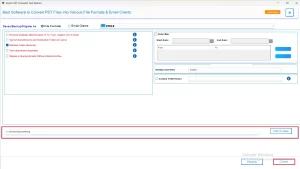
Procedure to Export PST to EMLX file:
- Launch the MacGater PST Converter Tool on your Mac computer.
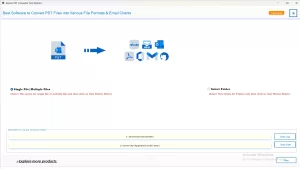
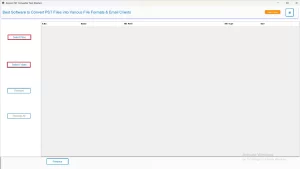
- Select either Select File or Select Folder to add PST files.
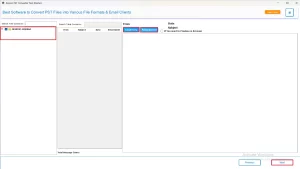
- You can preview the mailbox data loaded into the application.
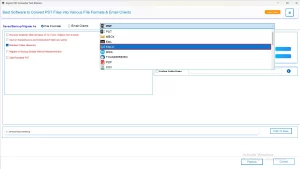
- Select the EMLX file format from the drop-down menu.
- IF you want any specific data, apply advanced filters for it.
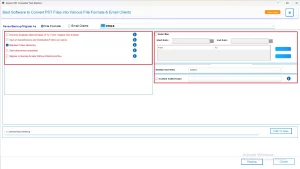
- Finally, choose the folder location and click Convert to convert Outlook PST to EMLX.
Key Features of MacGater PST Converter
- Convert PST files to various email formats such as EMLX, MBOX, EML, MSG, DOC, etc.
- Allows you to import PST files directly to IMAP and other cloud-based email applications.
- Maintain the individual folder structure, email hierarchy, and attachments.
- Supports corrupted, orphaned, or encrypted PST files.
- There is no need to install Microsoft Outlook to convert PST files.
Advantages of Using an Automated Solution
- No Technical Expertise Necessary: The software has a user-friendly interface that can easily be used by someone without technical skills.
- Speed: Multiple mailboxes can be converted in just a few minutes.
- Data Integrity: Retain the original formatting of emails, and the headers and attachments are not changed.
- Limitless Conversions: Save time by converting as many PSTs as you would like concurrently.
- There is no chance for the data being corrupted or lost: There is no chance of a crash or human error.
Conclusion
This blog post describes the processes to convert PST file to EMLX methods. Manual methods work fine for small PST files; however, manual methods are not viable for bulk migration or data that might be corrupted. The best method for conversion with efficiency, reliability, or security is to use the MacGater PST Converter for Mac.
Frequently Asked Questions
Q.1 Can I convert Outlook PST to EMLX manually?
Ans. Yes. You can import PST into Outlook for Mac, export the data to MBOX, and then import it into Apple Mail, which automatically saves messages as EMLX files. However, this process is lengthy and not suitable for bulk data.
Q.2 What’s the best way to convert PST files to EMLX?
Ans. The most efficient and safest way is to use the MacGater PST Converter Tool. It converts PST files directly to EMLX while preserving attachments, folder structure, and email formatting.
Q.3 Can I export emails from Outlook PST to EMLX on Mac?
Ans. Yes. Both manual and automated methods can be used on macOS. The automated approach, however, is faster and more reliable.
Q.4 Does converting PST to EMLX affect email attachments or formatting?
Ans. No. MacGater ensures all email details—including attachments, HTML formatting, and metadata are preserved during conversion.
Q.5 Can I use EMLX files on Windows after conversion?
Ans. Yes. Although EMLX is a Mac-based format, you can open it on Windows using compatible EMLX viewers or text editors.
About The Author:

Abhilash Dogra is a dedicated IT professional with more than 3 years of experience and has been a key member of Aryson Technology for the past 5 years. His expertise includes email migration and data recovery, with a strong focus on technologies such as MS Outlook and Office 365. In addition to this, Abhilash explores front-end technology and software development. He holds a Bachelor's degree in Computer Technology.