-
Written By Abhilash Dogra
-
Updated on February 13th, 2026
How to Convert MSG to HTML: Step-by-Step Guide
Overview: At present, over 70% of organizations prefer the HTML format as it is easier to open in any web browser. As a result, they decide to convert MSG to HTML. But for IT teams handling large numbers of MSG files, the manual methods take 30–40% more time for conversion in comparison to the automated approach. The conversion process simplifies the email accessibility and keeps the original layout intact. Continue reading this blog to explore different methods of conversion, including the MacGater MSG Converter, for an effortless conversion.
Why Do We Need to Export MSG to HTML?
There are several organizations & IT admins who prefer to convert their MSG files to HTML for various reasons. Given below are some of them.
- You can effortlessly open HTML files in any web browser without Microsoft Outlook.
- Users can easily share their emails across different teams & platforms.
- Moreover, HTML format keeps the original layout, images, and hyperlinks intact.
- Additionally, HTML files are easy to modify using basic text or HTML editors.
- Also, you can effortlessly embed emails into websites or intranet portals.
Proven Methods to Convert MSG to HTML
In this section of the article, we will discuss the actual steps of conversion in detail. Listed below are the two most commonly used methods to convert MSG files into HTML format.
- Using MS Outlook
- The Automated Software
Method 01: Convert Outlook MSG to HTML Using Microsoft Outlook
You can use Microsoft Outlook’s Save As option to convert your MSG files into HTML format. Follow the steps below carefully to avoid any kind of discrepancies in the conversion.
Simplified Tutorial to Convert MSG Files to HTML
- First, locate the folder where you have saved the required MSG files.
- After that, open an MSG file using Microsoft Outlook.
- Next, click on the File option & select Save As.
- Now, the Save As dialog box will appear on the screen.
- Under all the available file formats, choose HTML as the output format.
- Next, select the path to save the resultant file and click on the Save button.
- Now, repeat the same process for every MSG file you want to convert.
Drawbacks of the Manual Method
- Through this method, you can’t convert multiple MSG files in one go.
- It can take long hours to convert a large number of emails.
- Moreover, you may lose your original formatting, images, or metadata.
- Additionally, manual handling increases the chances of human errors.
Method 02: Automated Solution to Convert MSG to HTML
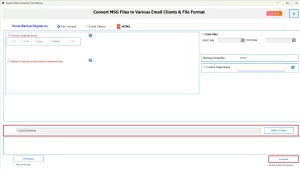
The MacGater MSG Converter is one of the most reliable software programs to convert the MSG emails to HTML. This software provides the user with a drag-and-drop feature to load multiple files/folders into the software efficiently. Moreover, the preview window lets users cross-verify their selected data before the conversion. Additionally, you can import MSG Files into Outlook 365, Thunderbird, Yahoo Mail, IMAP, etc., email clients. Also, the built-in features of the software eliminate duplication and eventually increase the efficiency of the conversion.
Quick Steps to Save MSG File as HTML
- Firstly, install the MacGater MSG Converter on your existing system.
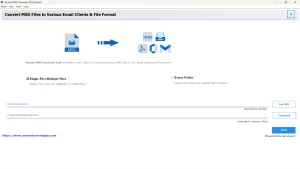
- Then, load the required MSG files using drag and drop method.
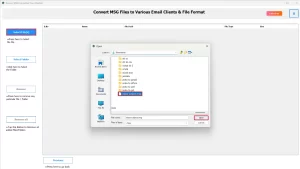
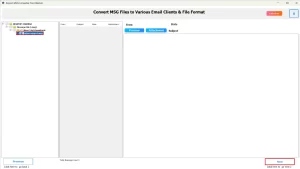
- After that, choose one or more files to preview and click Next.
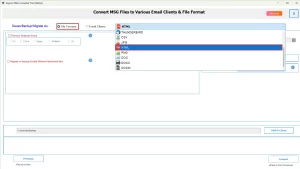
- Now, under the file formats drop-down list, select HTML as the output format.
- Use the additional features of the software, if required.
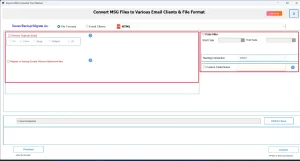
- Lastly, provide the path to save and click Convert to begin conversion.
Conclusion
From the above, we can say that there are several organizations and IT admins who convert MSG to HTML for better accessibility, collaboration, and documentation. The manual method works well for users having only a few emails. Whereas, for enterprises and IT professionals who manage data in bulk, it is advised to use the above automated solution. Even beginners can rely on the software’s simple interface & 24×7 technical support to accomplish their tasks efficiently without compromising data integrity.
Frequently Asked Questions
Q.1 Can I save MSG files as HTML without Outlook?
Ans. Yes, you can save MSG files as HTML without Outlook, using the MacGater MSG Converter. Steps to follow are as follows:
1. Install and launch the MacGater MSG Converter.
2. Add MSG files using the drag-and-drop option.
3. Preview selected files and click Next.
4. Choose HTML from the output format list.
5. Apply extra features if needed and click Convert.
Q.2 Can I convert MSG emails to HTML without losing images?
Ans. Yes, if you are using the above automated software, you can convert MSG emails to HTML without losing images.
Q.3 Is it possible to convert MSG files to HTML on Linux?
Ans. Yes, with the help of MacGater MSG Converter, it is possible to convert MSG files to HTML on Linux.
Q.4 Are there limitations on MSG file size for HTML conversion?
Ans. No, if you are opting for the above software, there is a limitation on the MSG file size for MSG to HTML Conversion.
About The Author:

Abhilash Dogra is a dedicated IT professional with more than 3 years of experience and has been a key member of Aryson Technology for the past 5 years. His expertise includes email migration and data recovery, with a strong focus on technologies such as MS Outlook and Office 365. In addition to this, Abhilash explores front-end technology and software development. He holds a Bachelor's degree in Computer Technology.