-
Written By Abhilash Dogra
-
Updated on February 13th, 2026
Convert EML to HTML: Quick & Easy Conversion
Overview: Have you ever tried to open an EML file and realized you can’t easily view it in a web browser? This is because EML files are inaccessible in web browsers. Therefore, in order to access your EML data in a web browser, you must convert EML to HTML. After conversion, you will be able to access EML data anytime without an email client. Read this article to explore the various methods of conversion, including the MacGater EML Converter, for a quick & secure conversion.
Why Export EML in HTML?
Listed below are several reasons why it is essential to convert EM files to HTML format.
- Users can easily open their HTML files in any web browser without an email client.
- The EML to HTML conversion keeps the original email formatting & layout intact.
- Moreover, you can use the HTML files for long-term archiving & documentation.
- Additionally, it is easier to share & view the HTML files across different platforms.
- Also, users can publish the resultant HTML files on websites or web portals.
Top Two Techniques to Convert EML to HTML
In this section, we will explore the actual methods to open EML files in HTML. The first method is to use MS Outlook for the entire conversion. Whereas the other method is to opt for the automated software for quick and secure conversion. Go through both the solutions one by one and choose a suitable one as required.
Technique 1: Convert EML File to HTML Using Outlook
MS Outlook provides a Save As feature to convert an EML file into HTML format. This method is suitable for users who need to convert a few EML files without using any automated software.
- Firstly, install Microsoft Outlook on your system,>> run it as administrator.
- After that, navigate to the File tab >> click on the Save As option.
- Next, specify a suitable name for the file in the designated field.
- Now, choose the HTML format under the Save as type dropdown list.
- At last, click on the Save button to convert the EML file into HTML format.
Limitations of the Manual Approach
- This method requires the user to install Microsoft Outlook.
- You can’t perform bulk conversion using this method.
- Moreover, you might lose formatting in case of complex layouts or embedded elements.
- Additionally, the email attachments might not always be saved along with the HTML file.
- Also, it may take you long hours to handle a large number of EML files.
Technique 2: Optimized Software to Convert EML to HTML
MacGater EML Converter is one of the most reliable software used to convert bulk EML data to HTML. This software maintains 100% data integrity and security via the preview window of the software. Moreover, this utility performs the entire conversion within a few clicks without affecting the folder structure. Additionally, users can import EML to HostGator mail, Thunderbird, Yahoo Mail, IMAP, etc., email clients using the same software. Also, you can use the additional features of the software, such as Skip Previous Mails, Remove Duplicate Mails, Data range filter, etc., to increase the efficiency of the users.
Quick Steps to Convert EML Files to HTML in Bulk
- First, download the MacGater EML Converter tool on your computer,>> run it.
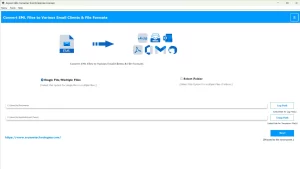
- After that, load the desired EML files to the software >> click Next.
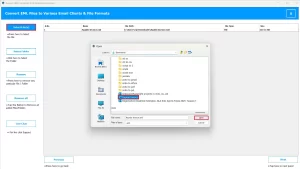
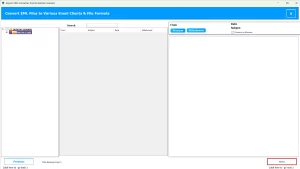
- Next, select the EML files you want to convert,>> preview them,>> Next.
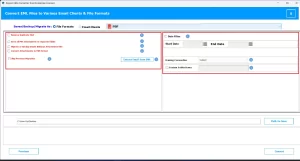
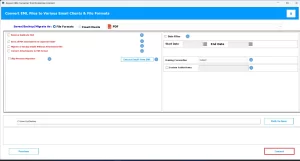
- Now, under the File Formats dropdown list, select HTML.
- At this point, use the advanced features of the software if required.
- Next, provide the path to save the resultant HTML file.
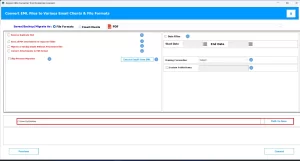
- At last, click on the Convert button to begin the EML to HTML conversion.
Conclusion
In this article, we discussed how users convert EML to HTML and leverage various benefits of the HTML format. The manual method provided a way to convert a few EML files using MS Outlook. On the other hand, the automated software works well for users with large datasets nd less time to invest. Users can also use the demo version of the software to get a hands-on experience of the software.
Frequently Asked Questions
Q.1 Can I convert EML to HTML offline without an internet connection?
Ans. Yes, using the MacGater EML Converter tool, you can convert your EML data into HTML offline without an internet connection.
Q.2 Will attachments appear in the HTML file after conversion?
Ans. After the conversion, the attachments will be saved in the form of a PDF. You can access these attachments by opening these PDFs via the Adobe Reader.
Q.3 Can I convert large EML files to HTML without errors?
Ans. Yes, with the help of the MacGater EML Converter tool, you can convert large EML files to HTML without errors.
About The Author:

Abhilash Dogra is a dedicated IT professional with more than 3 years of experience and has been a key member of Aryson Technology for the past 5 years. His expertise includes email migration and data recovery, with a strong focus on technologies such as MS Outlook and Office 365. In addition to this, Abhilash explores front-end technology and software development. He holds a Bachelor's degree in Computer Technology.